
Üldine võrgutopoloogia:

Sepp 1: Avage veebilehitseja ja minge http://cudy.net või http://192.168.10.1.
Detailide saamiseks vaadake Kuidas sisse logida Cudy Routeri veebiliidesesse?
Sammu 2: Avaneb aken Quick Setup, valige 'Wireless Extender', seejärel minge 'Next'.
.

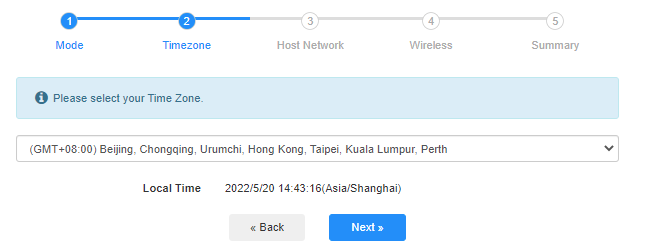
 Sepp 3: Vali oma 'Ajavöönd'.
Step 4: Valige host-võrk, mida soovite laiendada. Klõpsake nupule 'Connect'.

 Sepp 5: Sisestage host-võrgu traadita parool.

 Note: Veenduge, et sisestatud traadita parool on õige, vastasel juhul ei saa konfiguratsioon õnnestuda.
Sammu 6: Kohandage Wi-Fi nimi (SSID) ja parool on sama, mis teie vastuvõttevõrgus.

 Sepp 7: Vajutage 'Save & Apply', et lõpetada konfiguratsioon.

 Sepp 8: Ühendage oma traadita seadmed uuesti uude Wi-Fi-võrku.

 Note:
Note:
1. Kui seadistate traadita laiendamisrežiimi juhtmega seadme abil, ei pruugi sellel seadmel pärast seadistamist olla internetiühendust. Uue ühenduse saamiseks ühendage Ethernet-kaabel lahti ja ühendage see uuesti või lülitage võrguadapter välja ja lubage see uuesti sisse.
2. Pärast Cudy ruuteri seadistamist traadita laiendaja režiimis määrab IP-aadressi vastuvõttev ruuter ja vaikimisi IP-aadressi 192.168.10.1 ei saa sisse logida. Kui teil on vaja uuesti Cudy ruuterisse sisse logida, sisestage brauserisse 'http://cudy.net' või vaadake Cudy ruuteri IP-aadressi oma host-ruuteri kliendiloendist.
69 comments
@Christos,
Dear Customer,
Thanks for contacting the Cudy support team.
Yes, but you need to update the latest firmware 2.3.0 of WR1500 first. Then the router will support the range extender mode and WISP mode to connect the main WiFi.
https://www.cudy.com/pages/download-center/wr1500-1-0
“Hello.
Cudy WR1500 Wireless Router Wi‑Fi 6 with 3 Gigabit Ethernet Ports support wireless connection with the home internet route and act as repeater?”
Hello.
Cudy WR1500 Wireless Router Wi‑Fi 6 with 3 Gigabit Ethernet Ports support wireless connection with the home internet route and act as repeater?
@Uschi,
You can enable the WISP function to connect the main WiFi and share the network to all the client on LT400. Please have a try.
“Can I use the Cudy N300 4G LTE in Wireless Extender Mode?
In the Cudy App is no option for Wireless extender.”
Can I use the Cudy N300 4G LTE in Wireless Extender Mode?
In the Cudy App is no option for Wireless extender.
@Widny,
Dear Widny,
Thank you for contacting Cudy support team.
Sorry to tell you that all Cudy 4G/5G routers don’t support Bridge mode. We will provide feedback to the R&D department for evaluation to add this function.
“Good afternoon, I’m looking for a 5G router with Bridge mode and was wondering if your Cudy New 5G NR SA NSA AX3000 supports that feature.”