
Der MAC-Filter ist eine Technologie, die in WLAN-Routern eingesetzt wird, um unbefugten Zugriff auf Netzwerke zu verhindern. Die MAC-Adresse ist eine eindeutige Kennung, die jedem Gerät in einem Netzwerk zugewiesen wird. Ein WLAN-Router verwendet die MAC-Adresse, um das Gerät zu identifizieren und dessen Netzwerkzugriff zu steuern.mit welchem Netzwerk es sich verbinden soll.
Schritt 1: Öffnen Sie einen Webbrowser und gehen Sie zuhttp://cudy.netoderhttp://192.168.10.1Die
Für nähere Informationen sieheWie melde ich mich bei der Weboberfläche des Cudy Routers an?
Schritt 2:KlickenErweiterte Einstellungen->MAC-FilterimSicherheitAbschnitt.

Schritt 3: Überprüfen Sie die Einstellungen auf der MAC-Filterseite.

• Um das/die jeweilige(n) Gerät(e) zu blockieren
1. Wählen Sie „Alle außer der Liste zulassen'.
2. Wählen Sie in der Online-Geräteliste die zu blockierenden Geräte anhand ihrer MAC-Adresse und IP-Adresse aus.


Wenn das Online-Gerät, das Sie blockieren möchten, nicht aufgeführt ist, gehen SieZuSystemstatus->Geräte->MAC-Adresse kopieren->zurück zuMAC-Filter->Brauchund die MAC-Adresse einfügen.
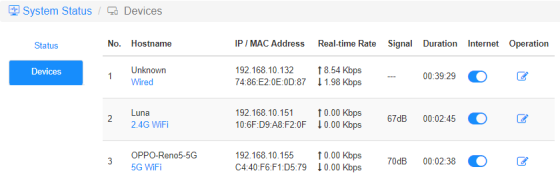
3.Speichern & Anwendenund das ausgewählte Gerät kann keine Internetverbindung mehr vom Router herstellen.
• Um die Nutzung des/der jeweiligen Geräts/Geräte zu ermöglichen
1. Wählen Sie „Nur Zulassungslistey'.
2. Wählen Sie das/die Gerät(e) aus, das/die auf das Internet zugreifen darf/n.

3.Speichern & Anwendenund nur die ausgewählten Geräte erhalten Internetzugang.
Hier ist eine einfache Möglichkeit, dasselbe wie ein MAC-Filter zu erreichen.
Internet
Über das Internet-Symbol können Sie den Internetzugang jedes Geräts aktivieren oder deaktivieren.
'OPPO-Reno5-5G' kann über den unten angegebenen Router keine Internetverbindung herstellen.

Betrieb
Klicken Sie auf dieBetriebDas Symbol kann einen neuen Namen für das Gerät festlegen.

Zeitliche Beschränkung des InternetsZugang
Der Zeitraum, in dem Geräte auf das Internet zugreifen dürfen.
Beispiel: Dem Gerät „Computer“ ist die Internetnutzung nur montags von 10 bis 20 Uhr gestattet.


12 Kommentare
@Dear tonalt,
Our technical support has sent you the solutions via email. Please check.
“it seems that an activated mac-filter also has an effect on the guest-network in the sense that the router doesn’t connect a guest to the internet! LT700E.
i think most people don’t like this and even worse: the activated mac filter on the guest network is not editable and it even worser it doesn’t use the mac table that is defined for the main wifi network.
so the mac filter is completely useless if one allows a guest-network.
probably i am wrong and the guest network can connect a guest to the internet with an activated mac-filter. but if so, please tell what i can do, to achieve this.”
it seems that an activated mac-filter also has an effect on the guest-network in the sense that the router doesn’t connect a guest to the internet! LT700E.
i think most people don’t like this and even worse: the activated mac filter on the guest network is not editable and it even worser it doesn’t use the mac table that is defined for the main wifi network.
so the mac filter is completely useless if one allows a guest-network.
probably i am wrong and the guest network can connect a guest to the internet with an activated mac-filter. but if so, please tell what i can do, to achieve this.
@Dear William and Dragan,
Thank you for your kindly advice! We will provide your feedback to the product department for evaluation. In fact, we already have this plan to develop this feature.
“I completely agree with William. I just can’t believe this kind of oversight was made. MAC filtering still hasn’t been added to the latest firmware 2.3.12. Please update the firmware and give us that function.”
“I just bought the Cudy WR11000 WiFi 7 Router and want to use it as an Access Point with MAC Filtering. But I just found out that there is no way to enable MAC Filtering when it is in Access Point mode. Why? You need to allow MAC Filtering in Access Point mode Not just only in Router mode! Please update the firmware and give us that function. I am on the latest firmware version 2.2.19.”
mine is WR3600
I completely agree with William. I just can’t believe this kind of oversight was made. MAC filtering still hasn’t been added to the latest firmware 2.3.12. Please update the firmware and give us that function.