
Port yönlendirme özelliği, internet üzerindeki uzak bilgisayarların özel yerel ağ (LAN) içindeki belirli bir bilgisayara veya hizmete bağlanmasına olanak tanır.
Farklı hizmetler farklı servis portları kullanır, lütfen yapılandırmadan önce servis port numarasını doğrulayın.
Önemli:
Cudy yönlendiricisinin İnternet Servis Sağlayıcınızdan bir Genel IP (WAN IP) adresi aldığından emin olun; eğer özel bir IP adresi alıyorsa, bu Cudy'nin önünde başka bir NAT cihazı olduğu anlamına gelir. Bu cihazda da servis portlarını açmanız gerekir.
IP adresinin herkese açık mı yoksa özel mi olduğunu nasıl doğrulayacağınız konusunda bilgi için lütfen şu bağlantıya bakın:
http://en.wikipedia.org/wiki/Private_network
Cudy'nin WAN IP adresini nasıl kontrol edebilirim?
Kablosuz Yönlendirici ve Mesh (Sistem Durumu > WAN > Durum)

4/5 Yönlendirici (Sistem Durumu->Hücresel/4G->Durum)

Not:
1. Genellikle, Genel IP ve IP Adresi aynıysa, Genel IP adresiniz olduğu anlamına gelir. IP Adresi, İnternet Servis Sağlayıcınızdan aldığınız WAN IP Adresidir. Yukarıdaki Genel IP ise diğer cihazların sizi internet üzerinden bulabileceği IP Adresidir. Dolayısıyla, Cudy yönlendirici özel bir IP adresi alıyorsa, bu Genel IP adresini hangi cihazın kullandığını bulmanız ve üzerinde portları açmanız gerekir.
2. Çoğu hücresel yönlendirici için internet servis sağlayıcısı genellikle özel bir IP adresi verir. Bu nedenle, port yönlendirmesi yapmak istiyorsanız, lütfen internet servis sağlayıcınızla iletişime geçerek size genel bir IP adresi atamalarını veya port yönlendirmesini onların tarafında yapmalarını isteyin.
Adım 1: Bir web tarayıcısı açın ve şu adrese gidin:http://cudy.netveyahttp://192.168.10.1.
Ayrıntılar için lütfen bakınız.Cudy Router'ın web arayüzüne nasıl giriş yapabilirim?
Adım 2: TıklamakGelişmiş Ayarlar -> Bağlantı Noktası YönlendirmeleriiçindeAğbölüm.

3. Adım:TıklamakEklemekListeye bir giriş eklemek için. Aşağıdaki gibi alana istediğiniz parametreleri girin.
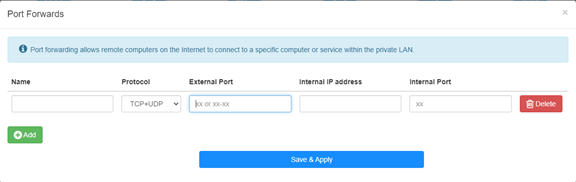
Örneğin:Aşağıdaki yapılandırmaya göre, 192.168.10.18 IP adresli sunucunun TCP 5000 portu, UDP 5001 portu ve hem TCP hem de UDP 6000 portu internete açılacaktır.

İsim:
Hafızayı kolaylaştırmak için kullanılan girişin adı.
Protokol:
TCP, UDP veya TCP+UDP
Harici Bağlantı Noktası:
WAN tarafında internetten erişilebilen servis portu.
Dahili IP adresi:
İnternete erişim sağlayacak portu açacak olan sunucunun IP adresi.
Dahili Bağlantı Noktası:
Yerel ağdaki ana bilgisayarın servis portu
Not:
Genellikle dahili port, harici portla aynıdır.
Adım 4: Tıklamak 'Kaydet ve UygulaAyarları kaydetmek için ' tuşuna basın.
Durum sayfasına gidin ve yönlendiricinin WAN IP adresini kontrol edin. Şimdi, açtığınız servise http://WAN IP:port numarası adresini kullanarak erişmeyi deneyebilirsiniz.
42 yorum
@Dear Giulio,
If the device you want to access is a windows computer. Please try to disable the firewall of the cpmputer and try again.
In addition, the device you want to access must set the correct gateway IP address (which is the LAN IP address of R700).
“I’m setting up a Wireguard vpn server on R700. The connection is successful and I can access the R700 web interface but no other IP. It seems that the vpn is not routed correctly. But in the router interface there are no advanced commands to manage the nat and I can’t access via ssh. How can it be solved”
I’m setting up a Wireguard vpn server on R700. The connection is successful and I can access the R700 web interface but no other IP. It seems that the vpn is not routed correctly. But in the router interface there are no advanced commands to manage the nat and I can’t access via ssh. How can it be solved
@Dear David,
I think the WAN IP address is not the public IP address. So the Port Forwards function will not work if you want to access it from the internet.
Is it possible to use the VPN function to do this?
“Hi. I have public IP address, but it’s not the same addres which I get from ISP DHCP (probably CGNAT).
How can I enter my public address during port forwarding setting?”
Hi. I have public IP address, but it’s not the same addres which I get from ISP DHCP (probably CGNAT).
How can I enter my public address during port forwarding setting?
@David,
Dear Customer,
Thank you for contacting Cudy support team. Our technical support has contacted you via email. Please check.
Setup Cudy Mesh network.
WR1300 unit is primary and has firmware 2.3.9.
Setup port forwarding.
Setup DDNS with no-ip with address XXX.ddns.net.
Can connect when on Internet.
When on LAN using XXX.ddns.net won’t work. Ports are the same. IP address works.
How do I enable NAT loopback to get it to work?