
MAC-фильтр — это технология, используемая в беспроводных маршрутизаторах для предотвращения несанкционированного доступа к сетям. MAC-адрес — это уникальный идентификатор, который присваивается каждому устройству в сети. Беспроводной маршрутизатор использует MAC-адрес для идентификации устройства и определенияк какой сети ему следует подключиться.
Шаг 1. Откройте веб-браузер и перейдите по адресу http://cudy.net< /a> или http://192.168. 10.1.
Подробную информацию см. на странице Как войти в веб-интерфейс Cudy Router?
Шаг 2: Нажмите Дополнительные настройки -> MAC-фильтр в Безопасность раздел.

Шаг 3: Проверьте настройки на странице фильтра MAC.

• Чтобы заблокировать определенные устройства
1. Выберите «Разрешить все, кроме списка».
2. Выберите устройства, которые необходимо заблокировать, в онлайн-списке устройств с учетом MAC-адреса и IP-адреса.


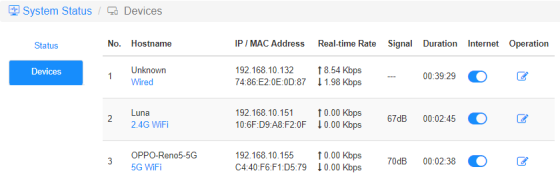
Если онлайн-устройства, которое вы хотите заблокировать, нет, перейдите в Состояние системы->Устройства- >скопируйте MAC-адрес->вернитесь к MAC-фильтру->< /span>Пользовательский и вставьте MAC-адрес.
3. Сохранить & Примените и выбранное устройство больше не сможет получать доступ к Интернету через маршрутизатор.
• Разрешить использование определенных устройств
1. Выберите «Разрешить только списокy».
2. Выберите устройства, которым разрешен доступ в Интернет.

3. Сохранить & Подайте заявку и только выбранные устройства смогут получить доступ к Интернету.
Вот простой способ сделать то же самое, что и MAC-фильтр.
Состояние системы-> Устройства
Интернет
Включайте и отключайте значок Интернета, чтобы контролировать доступ к Интернету каждого устройства.
'OPPO-Reno5-5G' не может подключиться к Интернету через указанный ниже маршрутизатор.

Действие
Нажмите Операция значок может указать новое имя устройства.

Ограничение доступа к Интернету по временидоступ
Период времени, в течение которого устройствам разрешен доступ к Интернету.
Пример: устройству «Компьютер» разрешено пользоваться Интернетом только в понедельник с 10 утра. до 20:00.


Комментариев: 12
@Dear tonalt,
Our technical support has sent you the solutions via email. Please check.
“it seems that an activated mac-filter also has an effect on the guest-network in the sense that the router doesn’t connect a guest to the internet! LT700E.
i think most people don’t like this and even worse: the activated mac filter on the guest network is not editable and it even worser it doesn’t use the mac table that is defined for the main wifi network.
so the mac filter is completely useless if one allows a guest-network.
probably i am wrong and the guest network can connect a guest to the internet with an activated mac-filter. but if so, please tell what i can do, to achieve this.”
it seems that an activated mac-filter also has an effect on the guest-network in the sense that the router doesn’t connect a guest to the internet! LT700E.
i think most people don’t like this and even worse: the activated mac filter on the guest network is not editable and it even worser it doesn’t use the mac table that is defined for the main wifi network.
so the mac filter is completely useless if one allows a guest-network.
probably i am wrong and the guest network can connect a guest to the internet with an activated mac-filter. but if so, please tell what i can do, to achieve this.
@Dear William and Dragan,
Thank you for your kindly advice! We will provide your feedback to the product department for evaluation. In fact, we already have this plan to develop this feature.
“I completely agree with William. I just can’t believe this kind of oversight was made. MAC filtering still hasn’t been added to the latest firmware 2.3.12. Please update the firmware and give us that function.”
“I just bought the Cudy WR11000 WiFi 7 Router and want to use it as an Access Point with MAC Filtering. But I just found out that there is no way to enable MAC Filtering when it is in Access Point mode. Why? You need to allow MAC Filtering in Access Point mode Not just only in Router mode! Please update the firmware and give us that function. I am on the latest firmware version 2.2.19.”
mine is WR3600
I completely agree with William. I just can’t believe this kind of oversight was made. MAC filtering still hasn’t been added to the latest firmware 2.3.12. Please update the firmware and give us that function.