
Маршрутизатор Cudy LTE имеет порт LAN/WAN, поэтому мы можем изменить режим работы порта и использовать сеть 4G/5G в качестве резервного решения для доступа в Интернет. Когда порт LAN/WAN работает в режиме WAN, маршрутизатор подключится к сети 4/5G в случае сбоя исходной сетевой службы.
Общая топология сети:

Шаг 1. Убедитесь, что сеть 4/5G уже настроена успешно.
Шаг 2. Подключите порт LAN/WAN вашего маршрутизатора к модему или сетевому порту.
Примечание. Убедитесь, что у вас уже есть модем или подключение к Интернету осуществляется через розетку Ethernet, которая обеспечивает вас доступом в Интернет.
Шаг 3. Откройте веб-браузер и перейдите по адресу http://cudy.net или http://192.168.10.1.
Подробную информацию см. в разделе Как войти в систему в веб-интерфейс Cudy Router?
Шаг 4. Перейдите в раздел Дополнительные настройки->Переключение LAN/WAN.

Шаг 5. Нажмите «Переключиться на WAN», после чего маршрутизатор перезагрузится и применит настройки.
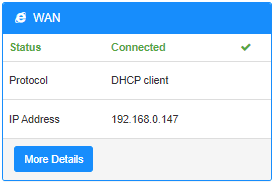
Шаг 6. Когда настройка будет завершена, вы увидите статус ниже на странице состояния системы.
Комментариев: 18
Hallo,
ich habe das gleiche Problem wie hier am 02.08.2025 geschildert:
“Hello I have internet being fed from another router (“Network A”) to my Cudy LTE Modem/Router (“Network B”). If Network A loses internet but is still working as a network (just no internet). The Cudy LTE failover does not kick in because it does not realize the internet is down. I tried changing the online detection settings but that did not work.”
@Dear H,
Our technical support has contacted you via email. Please check.
“Hello I have internet being fed from another router (“Network A”) to my Cudy LTE Modem/Router (“Network B”). If Network A loses internet but is still working as a network (just no internet). The Cudy LTE failover does not kick in because it does not realize the internet is down. I tried changing the online detection settings but that did not work.”
Hello I have internet being fed from another router (“Network A”) to my Cudy LTE Modem/Router (“Network B”). If Network A loses internet but is still working as a network (just no internet). The Cudy LTE failover does not kick in because it does not realize the internet is down. I tried changing the online detection settings but that did not work.
@Dear Molon,
The function depends on the “Advanced Setting” —“Online Check” function. Did you disable it. If yes, please enable it.
“Hello, first my cuddy Lte n300 working well on 4g. My point is I configure WAN, and when I put my câble, the router switch on WAN/4G. Until now everything is working as expected but if my main router has a connectivity issue, the cuddy router still continu to work on WAN whereas there is no more connectivity. So I don’t see the automatic switch on 4G”
Hello, first my cuddy Lte n300 working well on 4g. My point is I configure WAN, and when I put my câble, the router switch on WAN/4G. Until now everything is working as expected but if my main router has a connectivity issue, the cuddy router still continu to work on WAN whereas there is no more connectivity. So I don’t see the automatic switch on 4G