
Маршрутизаторы Cudy имеют встроенный веб-интерфейс, и эта внутренняя веб-страница не требует доступа в Интернет. Вы можете подключить свое устройство к маршрутизатору Cudy через Wi-Fi или Ethernet, чтобы войти на страницу веб-управления.
Шаг 1. Подключите компьютер к маршрутизатору Cudy через Беспроводное соединение или Проводное соединение.
Если Беспроводная связь: имя Wi-Fi по умолчанию и пароль напечатан на нижней этикетке маршрутизатора.
Если проводное: подключите компьютер к одному из < Strong data-mce-fragment="1">Порты LAN на задней панели маршрутизатора через кабель Ethernet.
Шаг 2. Откройте веб-браузер (Google, Firefox и т. д.) и введите http:/ /cudy.net или http ://192.168.10.1 в адресной строке.
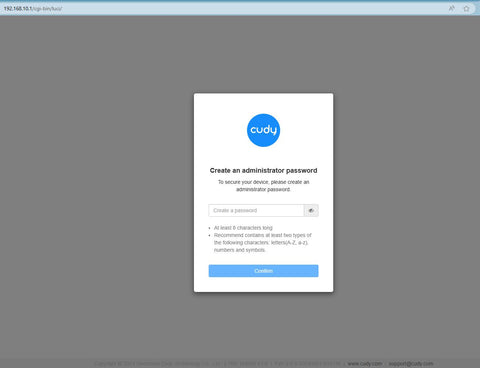
Шаг 3. Откроется приведенная ниже страница входа. . Выберите язык отображения страницы веб-управления и запрошенный пароль: «admin или создайте один пароль.

Устранение неполадок:
Если страница входа не отображается, попробуйте выполнить следующие действия по устранению неполадок:
1. Убедитесь, что http://cudy.net или http://192.168 .10.1 вводит в адресную строку, а не в строку поиска.
2. Если на компьютере установлен статический IP-адрес, измените его настройки, чтобы автоматически получать IP-адрес и адрес DNS-сервера.
3. Используйте другой веб-браузер и повторите попытку.
4. Меняйте разные клиентские устройства.
5. Перезагрузите или перезагрузите маршрутизатор и проверьте еще раз.
Как выполнить сброс: при включенном питании нажмите и удерживайте кнопку/отверстие сброса в течение 8 секунд.< /п>
6. Очистите файлы cookie вашего браузера.
7. Отключите и включите используемый сетевой адаптер.
Комментариев: 262
@Miguel,
Estimado cliente:
Gracias por contactar con el equipo de soporte de Cudy.
Nuestro soporte técnico le envió las soluciones por correo electrónico. Por favor, compruébelo.
“Mi router Cudy 4G LTE N300 no se conecta a internet. Utilizo tarjeta datos 4G de la operadora Simyo, que funcionaba perfectamente con mi anterior router Cudy. Porfavor envíenme la configuración idónea de mi router con mi operador de teléfono. Gracias”
I’m unable to change the numbered password on my Cudy WR 3000 to a personalized pw. I am using the same log in screen shown here but it is not accepting the password. How can I change the password to one that I can create? Currently we are connected to internet using the numbered password.
Mi router Cudy 4G LTE N300 no se conecta a internet. Utilizo tarjeta datos 4G de la operadora Simyo, que funcionaba perfectamente con mi anterior router Cudy. Porfavor envíenme la configuración idónea de mi router con mi operador de teléfono. Gracias
@Conchita,
Estimado cliente,
Gracias por contactar con el equipo de soporte de Cudy.
Nuestro soporte técnico le ha enviado las soluciones por correo electrónico. Por favor, compruébelo.
me dice conectado sin internet,gracias