
Port Forwards (Port forwarding) funkcija ļauj attāliem datoriem internetā izveidot savienojumu ar konkrētu datoru vai pakalpojumu privātajā LAN.
Dažādi pakalpojumi izmanto dažādus pakalpojumu portus, tāpēc pirms konfigurēšanas pārbaudiet pakalpojuma porta numuru.
Pārliecinieties, ka Cudy maršrutētājs saņem publisko IP (WAN IP) no jūsu interneta pakalpojumu sniedzēja, ja tas ir privātais IP, tas nozīmē, ka Cudy priekšā ir cita NAT ierīce. Arī šajā ierīcē ir jāatver pakalpojumu porti.
Lai pārbaudītu, vai IP adrese ir publiska vai privāta, lūdzu, skatiet šo saiti:
http://en.wikipedia.org/wiki/Private_network
Kā pārbaudīt Cudy WAN IP?
Bezvadu maršrutētājs & amp; Mesh (sistēmas statuss->WAN->statuss)

4/5 Maršrutētājs (sistēmas statuss->Cellular/4G->statuss)

Piezīme:
1. Parasti, ja publiskais IP un IP adrese ir vienādi, tas nozīmē, ka jums ir publiskais IP. IP adrese ir WAN IP adrese, ko saņemat no interneta pakalpojumu sniedzēja. Iepriekš norādītais publiskais IP ir IP adrese, pēc kuras cita ierīce var atrast jūs internetā. Tātad, ja Cudy maršrutētājs saņem privāto IP adresi, jums ir jānoskaidro, kura ierīce izmanto šo Publisko IP, un jāatver tās porti.
2. Lielākajai daļai mobilo sakaru maršrutētāju interneta pakalpojumu sniedzējs parasti piešķir privāto IP adresi. Tāpēc, ja vēlaties veikt portu pāradresāciju, sazinieties ar interneta pakalpojumu sniedzēju, lai jums piešķirtu publisku IP adresi vai veiktu portu pāradresāciju savā pusē.
1. solis: Atveriet tīmekļa pārlūkprogrammu un dodieties uz http://cudy.net vai http://192.168.10.1.
Sīkāku informāciju skatīt Kā pieteikties Cudy Router tīmekļa saskarnē?"
2. solis: Sekcijā Tīkls spiediet Paplašinātie iestatījumi -> Port Forwards .

3. solis: Noklikšķiniet uz Pievienot , lai pievienotu vienu ierakstu sarakstam. Ievadiet vajadzīgos parametrus laukā, kā norādīts turpmāk.
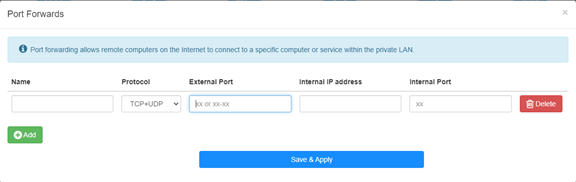
Piemēram: Atbilstoši šādai konfigurācijai tiks atvērts TCP ports 5000, UDP ports 5001 un abi TCP/UDP porti 6000 no saimnieka 192.168.10.18, lai piekļūtu internetam.

Nosaukums:
Ieraksta nosaukums, ko izmanto atmiņas atvieglošanai
Protokols:
TCP, UDP vai TCP+UDP
Iekšējais ports:
Pakalpojuma ports WAN pusē, kam var piekļūt no interneta
Iekšējā IP adrese:
Ieņēmēja IP adrese, kas atvērs portu uz internetu
Iekšējā osta:
Ieņēmēja pakalpojuma osta LAN pusē
Piezīme:
Save & amp; Apply", lai saglabātu iestatījumus.
Iet uz statusa lapu un pārbaudiet maršrutētāja WAN IP adresi. Tagad varat mēģināt izmantot http:// WAN IP: porta numuru, lai apmeklētu atvērto pakalpojumu.
42 comments
@David,
Estimado cliente:
Gracias por contactar con el equipo de apoyo de cudy.
La dirección IPv4 de la interfaz de red de área extendida del enrutador no es una dirección IP pública. Por lo tanto, incluso si se establece ddns, no puede acceder a la interfaz Wan del enrutador. El nombre de dominio ddns estará relacionado con la dirección IP pública de la línea.
Compruebe si la dirección IP Wan del enrutador principal es la misma que la dirección IP pública que verificó en el enrutador. Si es así, primero debe configurar el reenvío del puerto en el enrutador principal y luego el reenvío del puerto en el enrutador cudy.
“Ccuando configuro mi DDNS en el router Cudy para configurar no-ip.com me arroja el siguiente alerta en color rojo: the current external network IP is not a public IP, and the DDNS service may not work properly.
la informacion detallada del router es la siguiente:
public ip: 38.51.156.145* (no se que significa el asterisco al lado de la ip)
direccion ip: 192.168.55.2
mascara: 255.255.255.0
pasarela: 192.168.55.1
dns: 192.168.55.1
En otra ventana me arroja esta informacion:
Wan
direccion ip: 192.168.55.2
Lan
direccion ip: 192.168.10.1
cabe destacar que tengo conectado el DVR a un mesh y a este dvr le coloque ip: 192.168.10.200"
Ccuando configuro mi DDNS en el router Cudy para configurar no-ip.com me arroja el siguiente alerta en color rojo: the current external network IP is not a public IP, and the DDNS service may not work properly.
la informacion detallada del router es la siguiente:
public ip: 38.51.156.145* (no se que significa el asterisco al lado de la ip)
direccion ip: 192.168.55.2
mascara: 255.255.255.0
pasarela: 192.168.55.1
dns: 192.168.55.1
En otra ventana me arroja esta informacion:
Wan
direccion ip: 192.168.55.2
Lan
direccion ip: 192.168.10.1
cabe destacar que tengo conectado el DVR a un mesh y a este dvr le coloque ip: 192.168.10.200
@david,
Our technical support has sent you the solutions via email. Please check.
“Hoello, I need to change external adress during port redirecting. Address is given by my intrnet provider but it is different then detected by router. Unfortunatelly, there is no such possibility in html interface (or I can’t find it?) Router model: NT12
Thank you”
Hoello, I need to change external adress during port redirecting. Address is given by my intrnet provider but it is different then detected by router. Unfortunatelly, there is no such possibility in html interface (or I can’t find it?) Router model: NT12
Thank you
@Tomas,
Dear Customer,
Our technical support has contacted you via email. Please check.
“Hello,
I have an issue with setting port forwarding on LT700e.
It is supposed to be able to forward ports on VPN interface as well, but it does not work, ports are not forwarded correctly (they do not seems to be opened at all)
The purpose is to allow connecting to local service from other client in same VPN network.
VPN network itself seems to work fine.
Could you please advice?”