
Port Forwards (Port forwarding) funkcija ļauj attāliem datoriem internetā izveidot savienojumu ar konkrētu datoru vai pakalpojumu privātajā LAN.
Dažādi pakalpojumi izmanto dažādus pakalpojumu portus, tāpēc pirms konfigurēšanas pārbaudiet pakalpojuma porta numuru.
Pārliecinieties, ka Cudy maršrutētājs saņem publisko IP (WAN IP) no jūsu interneta pakalpojumu sniedzēja, ja tas ir privātais IP, tas nozīmē, ka Cudy priekšā ir cita NAT ierīce. Arī šajā ierīcē ir jāatver pakalpojumu porti.
Lai pārbaudītu, vai IP adrese ir publiska vai privāta, lūdzu, skatiet šo saiti:
http://en.wikipedia.org/wiki/Private_network
Kā pārbaudīt Cudy WAN IP?
Bezvadu maršrutētājs & amp; Mesh (sistēmas statuss->WAN->statuss)

4/5 Maršrutētājs (sistēmas statuss->Cellular/4G->statuss)

Piezīme:
1. Parasti, ja publiskais IP un IP adrese ir vienādi, tas nozīmē, ka jums ir publiskais IP. IP adrese ir WAN IP adrese, ko saņemat no interneta pakalpojumu sniedzēja. Iepriekš norādītais publiskais IP ir IP adrese, pēc kuras cita ierīce var atrast jūs internetā. Tātad, ja Cudy maršrutētājs saņem privāto IP adresi, jums ir jānoskaidro, kura ierīce izmanto šo Publisko IP, un jāatver tās porti.
2. Lielākajai daļai mobilo sakaru maršrutētāju interneta pakalpojumu sniedzējs parasti piešķir privāto IP adresi. Tāpēc, ja vēlaties veikt portu pāradresāciju, sazinieties ar interneta pakalpojumu sniedzēju, lai jums piešķirtu publisku IP adresi vai veiktu portu pāradresāciju savā pusē.
1. solis: Atveriet tīmekļa pārlūkprogrammu un dodieties uz http://cudy.net vai http://192.168.10.1.
Sīkāku informāciju skatīt Kā pieteikties Cudy Router tīmekļa saskarnē?"
2. solis: Sekcijā Tīkls spiediet Paplašinātie iestatījumi -> Port Forwards .

3. solis: Noklikšķiniet uz Pievienot , lai pievienotu vienu ierakstu sarakstam. Ievadiet vajadzīgos parametrus laukā, kā norādīts turpmāk.
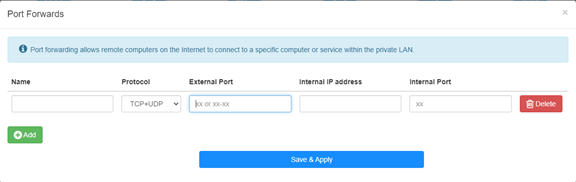
Piemēram: Atbilstoši šādai konfigurācijai tiks atvērts TCP ports 5000, UDP ports 5001 un abi TCP/UDP porti 6000 no saimnieka 192.168.10.18, lai piekļūtu internetam.

Nosaukums:
Ieraksta nosaukums, ko izmanto atmiņas atvieglošanai
Protokols:
TCP, UDP vai TCP+UDP
Iekšējais ports:
Pakalpojuma ports WAN pusē, kam var piekļūt no interneta
Iekšējā IP adrese:
Ieņēmēja IP adrese, kas atvērs portu uz internetu
Iekšējā osta:
Ieņēmēja pakalpojuma osta LAN pusē
Piezīme:
Save & amp; Apply", lai saglabātu iestatījumus.
Iet uz statusa lapu un pārbaudiet maršrutētāja WAN IP adresi. Tagad varat mēģināt izmantot http:// WAN IP: porta numuru, lai apmeklētu atvērto pakalpojumu.
42 comments
博主,你好!
最近使用tr3000路由器使用ipv6时测试端口转发,发现无法映射到内网ipv4地址,请问有解决办法吗?
@Dear Yuri,
Our technical support has contacted you via email. Please check.
“I eagerly awaited a response from someone who could help me with the problem I described… I followed your instructions and set up the ZeroTier network. But it doesn’t solve my problem!
The host I want to connect to via RDP does not have the ZeroTier network client – Windows 8.1. I installed different versions from 1.6.6 to 1.8.8, but the network on the host did not start (the firewall is disabled).
Perhaps to connect from my host (with ZeroTier), I only need one rule in the routing on the cudy 3600 router located in ZeroTier, and/or to create a bridge?”
I eagerly awaited a response from someone who could help me with the problem I described… I followed your instructions and set up the ZeroTier network. But it doesn’t solve my problem!
The host I want to connect to via RDP does not have the ZeroTier network client – Windows 8.1. I installed different versions from 1.6.6 to 1.8.8, but the network on the host did not start (the firewall is disabled).
Perhaps to connect from my host (with ZeroTier), I only need one rule in the routing on the cudy 3600 router located in ZeroTier, and/or to create a bridge?
@Dear Yuri,
You can add Routing rules on the Zerotier Management console page to meet you requirement. Please refer to this article on the website.
http://cudy.com/blogs/faq/how-to-remote-connect-cudy-router-via-zerotier?pos=1&_sid=33968118a&ss=r
“There is a Zerotier network with one host and one router. Physically, they are located in different networks with different providers behind grey IPs. How can I redirect an RDP connection on the router to another host that does not have Zerotier and is located in the same local network as the router?”
There is a Zerotier network with one host and one router. Physically, they are located in different networks with different providers behind grey IPs. How can I redirect an RDP connection on the router to another host that does not have Zerotier and is located in the same local network as the router?