
MAC filtras - tai belaidžiuose maršrutizatoriuose naudojama technologija, skirta užkirsti kelią neteisėtai prieigai prie tinklų. MAC adresas - tai unikalus identifikatorius, priskiriamas kiekvienam tinkle esančiam įrenginiui. Belaidis maršruto parinktuvas naudoja MAC adresą įrenginiui identifikuoti ir nustatyti, prie kurio tinklo jis turėtų prisijungti.
1 žingsnis: Atverkite interneto naršyklę ir eikite į http://cudy.net arba http://192.168.10.1.
Išsamesnės informacijos rasite Kaip prisijungti prie "Cudy Router" žiniatinklio sąsajos?
2 žingsnis: Spustelėkite Išplėstiniai nustatymai -> MAC filtras skyriuje Security.

Trečias žingsnis: Patikrinkite nustatymus MAC filtro puslapyje.

- Užblokuoti konkretų (-ius) įrenginį (-ius)
1. Pasirinkite "Leisti viską, išskyrus sąrašą".
2. Pasirinkite įrenginį (-ius), kurį (-iuos) norite blokuoti internetiniame įrenginių sąraše pagal MAC adresą ir IP adresą.


Jeigu internetinio įrenginio, kurį norite blokuoti, nėra, eikite į į Sistemos būsena->Įrenginiai->nukopijuokite MAC adresą->grįžkite į MAC filtras->Kompleksinis ir įklijuokite MAC adresą.
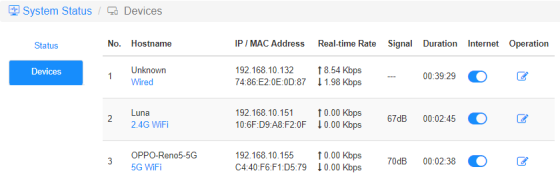
3. Save &; Apply ir pasirinktas įrenginys nebegalės gauti interneto iš maršrutizatoriaus.
- Leisti konkretų (-ius) įrenginį (-ius)
1. Pasirinkite "Atleisti sąrašą only".
2. Pasirinkite įrenginį (-ius), kuriam (-iems) leisite gauti internetą.

3. Save & amp; Apply ir tik pasirinkti įrenginiai galės gauti prieigą prie interneto.
Toliau pateikiamas paprastas būdas, kuriuo galima padaryti tą patį, ką ir MAC filtru.
Internetas
Įjunkite ir išjunkite interneto piktogramą, kad galėtumėte valdyti kiekvieno įrenginio prieigą prie interneto.
"OPPO-Reno5-5G" negali gauti interneto per toliau nurodytą maršrutizatorių.

Operacija
Paspaudę piktogramą Operation galite nurodyti naują įrenginio pavadinimą.

Laiko apribojimas interneto aprieigai
Terminas, kuriuo įrenginiams leidžiama naudotis internetu.
Pavyzdys: Įrenginiui "Kompiuteris" leidžiama naudotis internetu tik pirmadienį nuo 10 iki 20 val.


12 comments
@Dear tonalt,
Our technical support has sent you the solutions via email. Please check.
“it seems that an activated mac-filter also has an effect on the guest-network in the sense that the router doesn’t connect a guest to the internet! LT700E.
i think most people don’t like this and even worse: the activated mac filter on the guest network is not editable and it even worser it doesn’t use the mac table that is defined for the main wifi network.
so the mac filter is completely useless if one allows a guest-network.
probably i am wrong and the guest network can connect a guest to the internet with an activated mac-filter. but if so, please tell what i can do, to achieve this.”
it seems that an activated mac-filter also has an effect on the guest-network in the sense that the router doesn’t connect a guest to the internet! LT700E.
i think most people don’t like this and even worse: the activated mac filter on the guest network is not editable and it even worser it doesn’t use the mac table that is defined for the main wifi network.
so the mac filter is completely useless if one allows a guest-network.
probably i am wrong and the guest network can connect a guest to the internet with an activated mac-filter. but if so, please tell what i can do, to achieve this.
@Dear William and Dragan,
Thank you for your kindly advice! We will provide your feedback to the product department for evaluation. In fact, we already have this plan to develop this feature.
“I completely agree with William. I just can’t believe this kind of oversight was made. MAC filtering still hasn’t been added to the latest firmware 2.3.12. Please update the firmware and give us that function.”
“I just bought the Cudy WR11000 WiFi 7 Router and want to use it as an Access Point with MAC Filtering. But I just found out that there is no way to enable MAC Filtering when it is in Access Point mode. Why? You need to allow MAC Filtering in Access Point mode Not just only in Router mode! Please update the firmware and give us that function. I am on the latest firmware version 2.2.19.”
mine is WR3600
I completely agree with William. I just can’t believe this kind of oversight was made. MAC filtering still hasn’t been added to the latest firmware 2.3.12. Please update the firmware and give us that function.