
Bendroji tinklo topologija:

1 žingsnis: Atidarykite interneto naršyklę ir eikite į http://cudy.net arba http://192.168.10.1.
Detalesnę informaciją rasite Kaip prisijungti prie "Cudy Router" žiniatinklio sąsajos?
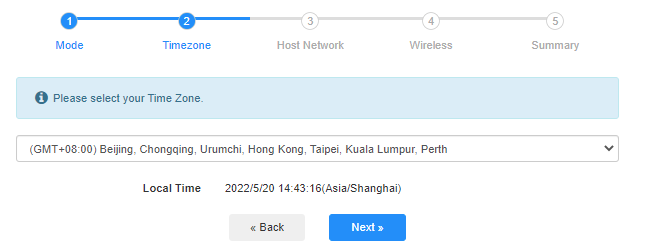
2. žingsnis: Atsidarys greitosios sąrankos langas, pasirinkite "Bezlaidis plėstuvas", tada eikite "Toliau".

 Trečias žingsnis: Pasirinkite "Vaiko juostą".
4 etapas: Pasirinkite norimą išplėsti kompiuterių tinklą. Spustelėkite "Prijungti".

 5-asis žingsnis: Įveskite priimančiojo tinklo belaidžio ryšio slaptažodį.

 Pastaba: Įsitikinkite, kad įvestas belaidžio ryšio slaptažodis yra teisingas, kitaip konfigūracija nebus sėkminga.
Šeštas žingsnis: Pritaikykite Wi-Fi pavadinimą (SSID) ir slaptažodį, kuris sutampa su jūsų pagrindinio tinklo slaptažodžiu.

 Step 7: Spustelėkite "Save &; Apply", kad užbaigtumėte konfigūravimą.

 8-as žingsnis:Perjunkite belaidžius įrenginius prie naujo Wi-Fi tinklo.

 Pastaba:
1. Jei nustatote belaidžio plėstuvo režimą naudodami laidinį įrenginį, po nustatymo šis įrenginys gali neturėti interneto. Atjunkite ir prijunkite eterneto kabelį arba išjunkite ir įjunkite tinklo adapterį, kad įgytumėte naują ryšį.
2. Nustačius Cudy maršrutizatorių belaidžio plėstuvo režimu, IP adresą priskirs pagrindinis maršrutizatorius, o numatytuoju IP adresu 192.168.10.1 prisijungti nebus galima. Jei vėl reikia prisijungti prie Cudy maršrutizatoriaus, naršyklėje įveskite "http://cudy.net' arba ieškokite Cudy maršrutizatoriaus IP adreso priimančiojo maršrutizatoriaus klientų sąraše.
69 comments
приобрел роутер cudy BE 3600 WR 3600E v1.0, прошивка 2.3.15, подключаю его по инструкции в режиме усилитель сигнала , ввожу все как полагается пароль от основной сети , далее роутер создает две сети с приставкой EXT, пароль как у основной сети оставляю, прохожу все пути мне пишет подключитесь к новой сети , я подключаюсь интернета нет. Захожу в приложение связи Cudy с основным роутером нет, делаю повторно процедуру все так же новая сеть появляется интрнета нет. Что делать ??? До этого был роутер тоже Cudy wr3000 там был режим WISP с этим режимом мне удавалось расширить сеть. В WR3600E такого режима нет, токлько усилитель сигнала.
@Dear Teresa,
1. Please update the latest firmware for your RE1200 and check again.
2. If the problem remains, Has RE1200 been connected to the WiFi signal of the main router? If the RE1200 has been connected to the WiFi signal of the main router, are you connected to the 5GHz WiFi signal of the main router or the 2.4GHz WiFi signal? Generally speaking, 5GHz has higher performance, so it is recommended that you connect to a 5GHz signal.
3. If RE1200 has successfully connected to the WiFi signal of the main router, please describe the specific problems currently encountered. For example, mobile phones and other terminals cannot search for RE1200’s WiFi signal? Mobile phones and other terminals search for RE1200’s WiFi signal but cannot connect? Mobile phones and other terminals can search for RE1200’s WiFi signal and connect, but cannot access the Internet?
In addition, please adjust the placement to the appropriate place according to the color of the RE indicator light. Solid blue light indicates that the WiFi signal connection between the RE1200 and the main router is good.
“I have the Cudy RE1200 and I’m having endless problems, keeps disconnecting, I’m at my wits end!”
I have the Cudy RE1200 and I’m having endless problems, keeps disconnecting, I’m at my wits end!
@Уважаемый Владимир,
Пожалуйста, перейдите в раздел «Общие настройки» — на страницу функции «WISP». Там вы сможете включить эту функцию и настроить устройство в качестве Wi-Fi-повторителя.
“CUDY LT500D не получается настроить его как репитор. при первичной настройке нету раздела для выбора режима модема… как это можно исправить?”
CUDY LT500D не получается настроить его как репитор. при первичной настройке нету раздела для выбора режима модема… как это можно исправить?