
לנתבים של Cudy יש ממשק אינטרנט מובנה ודף אינטרנט פנימי זה אינו דורש גישה לאינטרנט. ניתן לחבר את המכשיר שלך לנתב Cudy באמצעות Wi-Fi או Ethernet כדי להתחבר לדף ניהול האינטרנט.
שלב 1:חבר את המחשב שלך לנתב Cudy שלך דרךאַלחוּטאוֹקווי.
אִםאַלחוּטשם וסיסמת ה-Wi-Fi המוגדרים כברירת מחדל מודפסים על התווית התחתונה של הנתב שלך.
אִםקוויחבר את המחשב שלך לאחד מיציאות LANבגב הנתב באמצעות כבל אתרנט.
שלב 2פתח דפדפן אינטרנט (גוגל, פיירפוקס, אדג' וכו') והזןhttp://cudy.netאוֹhttp://192.168.10.1בשורת הכתובת.
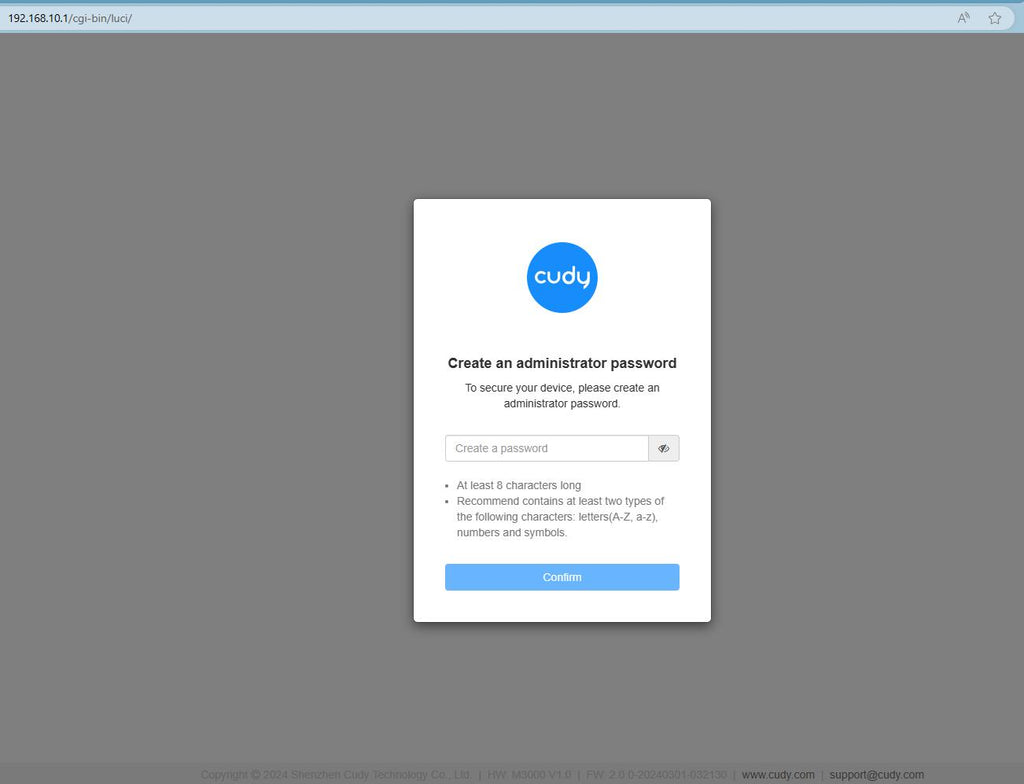
שלב 3דף ההתחברות למטה יופיע. בחר את שפת התצוגה של דף ניהול האינטרנט והסיסמה המבוקשת היא 'מנהלאו שצריך ליצור סיסמה אחת.

פתרון בעיות:
אם דף ההתחברות אינו מופיע, נסה את שלבי פתרון הבעיות הבאים באתר:
מה עליי לעשות אם איני מצליח לגשת לממשק האינטרנט של הנתב Cudy שלי?
368 תגובות
اريد تغيير كلمة سر الانترنت
@Dear Akhona,
You can login to the web page of your Cudy product to do the changes.
“I need to change password and also stop scanning”
I need to change password and also stop scanning
@Dear Ziad yamout,
You can try to reset the router to factory default by long pressing the reset button for about 3 seconds. You can release the reset button when the LED flashes. You must create a new password when first login to the web page of the router.
Note: All the configuration will be cleared. You must reconfigure the router after resetting your router.
“I can’t access the admin password”
I can’t access the admin password