
תכונת Port Forwarding (העברת פורטים) מאפשרת למחשבים מרוחקים באינטרנט להתחבר למחשב או שירות ספציפיים בתוך רשת מקומית פרטית.
שירותים שונים משתמשים ביציאות שירות שונות, אנא ודא את מספר יציאת השירות לפני ביצוע התצורה.
חָשׁוּב:
ודא שנתב Cudy מקבל כתובת IP ציבורית (WAN IP) מספק שירותי האינטרנט שלך. אם מדובר בכתובת IP פרטית, פירוש הדבר שיש התקן NAT נוסף מול Cudy. עליך לפתוח גם את פורטי השירות במכשיר זה.
כדי לוודא שכתובת ה-IP היא ציבורית או פרטית, אנא עיינו בקישור הזה:
http://en.wikipedia.org/wiki/Private_network
איך לבדוק את כתובת ה-IP של ה-WAN של Cudy?
נתב אלחוטי ורשת (מצב מערכת->WAN->מצב)

נתב 4/5 (מצב מערכת->סלולרי/4G->מצב)

פֶּתֶק:
1. בדרך כלל, אם ה-IP הציבורי וכתובת ה-IP זהות, פירוש הדבר שיש לך IP ציבורי. כתובת ה-IP היא כתובת ה-IP של ה-WAN שאתה מקבל מספק שירותי האינטרנט שלך. כתובת ה-IP הציבורית הנ"ל היא כתובת ה-IP שהמכשיר השני יכול למצוא אותך דרך האינטרנט. לכן, אם הנתב של Cudy מקבל כתובת IP פרטית, עליך להבין איזה מכשיר משתמש ב-IP ציבורי זה ולפתוח בו פורטים.
2. עבור רוב הנתבים הסלולריים, ספק שירותי האינטרנט בדרך כלל נותן את כתובת ה-IP הפרטית. לכן, אם ברצונך לבצע העברת פורטים, אנא צור קשר עם ספק שירותי האינטרנט שלך כדי שיקצה לך כתובת IP ציבורית או יבצע את העברת הפורטים מטעמו.
שלב 1פתח דפדפן אינטרנט ועבור אלhttp://cudy.netאוֹhttp://192.168.10.1.
לפרטים, אנא עיינו באיך להתחבר לממשק האינטרנט של נתב Cudy?
שלב 2: לחץהגדרות מתקדמות -> העברת פורטיםב-רֶשֶׁתסָעִיף.

שלב 3:נְקִישָׁהלְהוֹסִיףכדי להוסיף ערך אחד לרשימה. הזינו את הפרמטרים כרצונכם בשדה כפי שמופיע למטה.
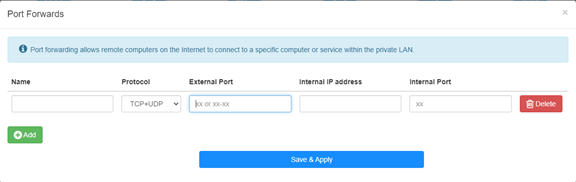
לְדוּגמָה:בהתאם להגדרות הבאות, יציאת TCP 5000, יציאת UDP 5001 ויציאת TCP/UDP 6000 של המארח 192.168.10.18 ייפתחו לאינטרנט.

שֵׁם:
שם הערך, המשמש לקידום הזיכרון
פּרוֹטוֹקוֹל:
TCP, UDP או TCP+UDP
יציאה חיצונית:
יציאת שירות בצד ה-WAN שאליה ניתן לגשת מהאינטרנט
כתובת IP פנימית:
כתובת ה-IP של המארח, שתפתח את הפורט לאינטרנט
יציאה פנימית:
יציאת השירות של המארח ברשת המקומית (LAN)
פֶּתֶק:
באופן כללי, יציאה פנימית זהה ליציאה חיצונית.
שלב 4לחץ על 'שמור והחל' כדי לשמור את ההגדרות.
עבור לדף הסטטוס ובדוק את כתובת ה-IP של הנתב (WAN). כעת תוכל לנסות להשתמש במספר היציאה http:// WAN IP: כדי לבקר בשירות שפתחת.
42 comments
@T.K
Dear Customer,
Our technical support has sent you the solutions via email. Please check.
“I have WR3000 and I tried to open FTP (active) ports to my NAS. My ISP blocks ports 20-21 so I defined in port forward extrenal ports as 2020-2021 and internal ports as 20-21, but I can’t connect to my NAS! Whats wrong? Same kind of configuration worked fine with my previous mesh network (Netgear Orbi).
NAS does not allow changing ftp ports, so router must do port forward (both directions)
NAS is connected to agent, but this can’t be issue?
I have tried with enabled & disables ALG ftp, but it doesn’t help.”
Hello,
I have an issue with setting port forwarding on LT700e.
It is supposed to be able to forward ports on VPN interface as well, but it does not work, ports are not forwarded correctly (they do not seems to be opened at all)
The purpose is to allow connecting to local service from other client in same VPN network.
VPN network itself seems to work fine.
Could you please advice?
I have WR3000 and I tried to open FTP (active) ports to my NAS. My ISP blocks ports 20-21 so I defined in port forward extrenal ports as 2020-2021 and internal ports as 20-21, but I can’t connect to my NAS! Whats wrong? Same kind of configuration worked fine with my previous mesh network (Netgear Orbi).
NAS does not allow changing ftp ports, so router must do port forward (both directions)
NAS is connected to agent, but this can’t be issue?
I have tried with enabled & disables ALG ftp, but it doesn’t help.
@stephen,
Our technical support has sent you the solutions via email. Please check. You can try to set the IP address of the XBOX to be the DMZ IP address and check if the problem fixed?
“Just setting up Cudy router for home but when I connect the Xbox it says double nat detected. How do I configure the router to stop that please ? Thank you”
Just setting up Cudy router for home but when I connect the Xbox it says double nat detected. How do I configure the router to stop that please ? Thank you