
Les routeurs Cudy disposent d'une interface web intégrée, et cette page web interne ne nécessite pas d'accès à Internet. Vous pouvez connecter votre appareil au routeur Cudy via Wi-Fi ou Ethernet pour accéder à la page de gestion web.
Étape 1 :Connectez votre ordinateur à votre routeur Cudy viaSans filouCâblé.
SiSans fil:Le nom et le mot de passe Wi-Fi par défaut sont imprimés sur l'étiquette inférieure de votre routeur.
SiCâblé:Connectez votre ordinateur à l'un desPorts LANà l'arrière du routeur via un câble Ethernet.
Étape 2:Ouvrez un navigateur Web (Google, Firefox, Edge, etc.) et entrezhttp://cudy.netouhttp://192.168.10.1dans la barre d'adresse.
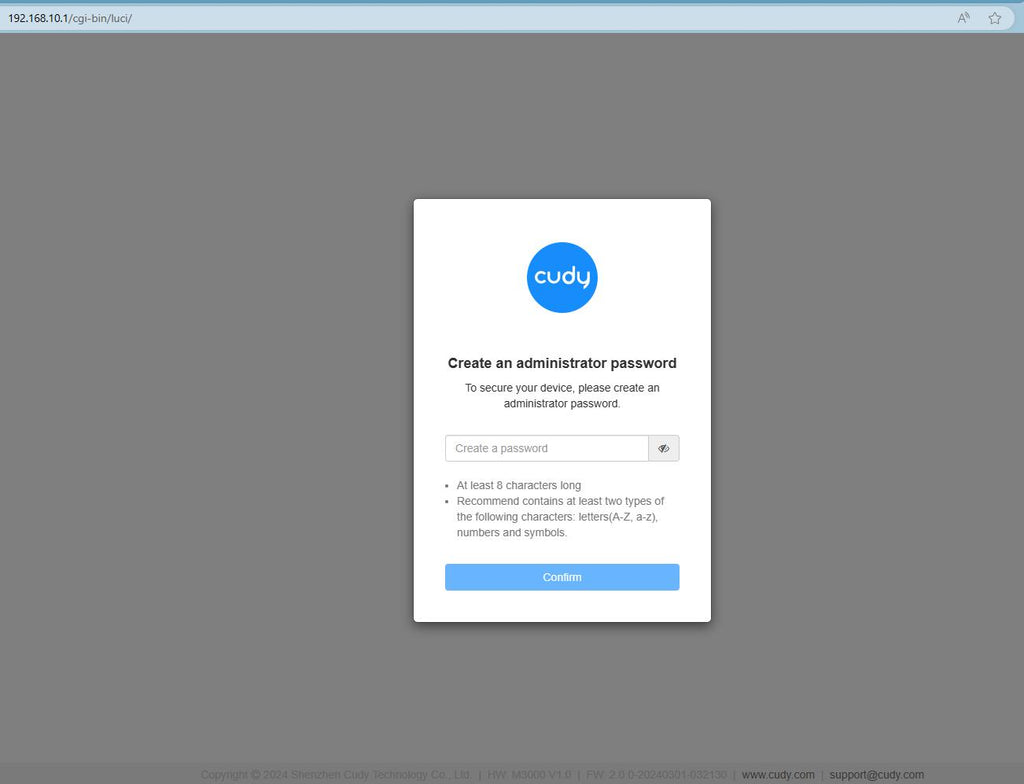
Étape 3: La page de connexion ci-dessous s'affichera. Choisissez la langue d'affichage de la page de gestion web et le mot de passe demandé est « ».administrateur' ou besoin de créer un mot de passe.

Dépannage :
Si la page de connexion ne s'affiche pas, essayez les étapes de dépannage suivantes sur le site Web :
Que dois-je faire si je ne parviens pas à accéder à l'interface Web de mon routeur Cudy ?
346 commentaires
I want password of router
@Dear Jabulani,
1. What is the model of your Cudy product? You can check the model on the label at the bottom of the device.
2. How do you connect the deivce? If it is a router. Do you connect the WAN port of the Cudy router to the previous device( such as the ONT or modem)?
3. What is the problem like? Can you login to the web page of the router and check the SYSTEM Status page?
“My wifi is not working right now”
My wifi is not working right now
@Dear Dumisani,
I don’t understand you well. If you want to change the password and name of your starlink router. Why do you contact Cudy support?
“I want to change my password and name of the sarlink but it’s refusing to get out it still appears in my phone settings”
I want to change my password and name of the sarlink but it’s refusing to get out it still appears in my phone settings