
See õpetus näitab teile, kuidas luua VPN-tunnel teie Cudy masina ja mis tahes teise arvuti vahel. ZeroTier on üks lihtsamaid VPN-teenuseid, mida on võimalik seadistada ja see on täiesti tasuta kuni 50 seadme jaoks. Kogu protsess, algusest lõpuni, peaks võtma vaid mõned minutid.
1. Loo ZeroTier kontod
2. Looge võrk
- span data-mce-fragment="1">
- Kui olete ZeroTierisse sisse loginud, navigeerige Võrgustikud vahekaardile .
- Klikkige Create New Network ja teie võrgu ID on kasutajaliideses nähtav

3. Valige avalik või privaatne juurdepääs
Juurdepääsu haldamiseks on kaks võimalust: Avalik või privaatne
Üldine võrk: Igaüks, kellel on võrgu ID, saab ühendust luua. See on kõige lihtsam variant, kuid veidi vähem turvaline.
- Klikkige ZeroTier'i kasutajaliideses võrgule .
- Valige juurdepääsukontrolli all valik Avalik võrk:

Privaatne võrk: Kõik masinad tuleb enne ühendamist ZeroTier-liidese kaudu heaks kiita. See on vaikimisi valik ja turvalisem.
- Kui masinad võrgustikuga liituvad (vt samm 4), tuleb nad heaks kiita jaotises Liikmed. Iga masina kinnitamiseks tuleb lihtsalt märkida ruut veerus Auth?:
4. Seadistage Cudy ruuter
- A. Avage veebilehitseja ja logige sisse aadressil http://cudy.net/ või http://192.168.10.1/ .
- B. Minge Zerotier'i seadistamiseks jaotisse General Settings -> VPN, valige Zerotier master ja sisestage Zerotier Network ID. Seejärel klõpsake Save ja Apply.

- C. Kui te konfigureerite oma võrgu privaatvõrguks,peab Cudy Router'i kinnitamiseks uuesti märkima veerus Auth? oleva kasti.
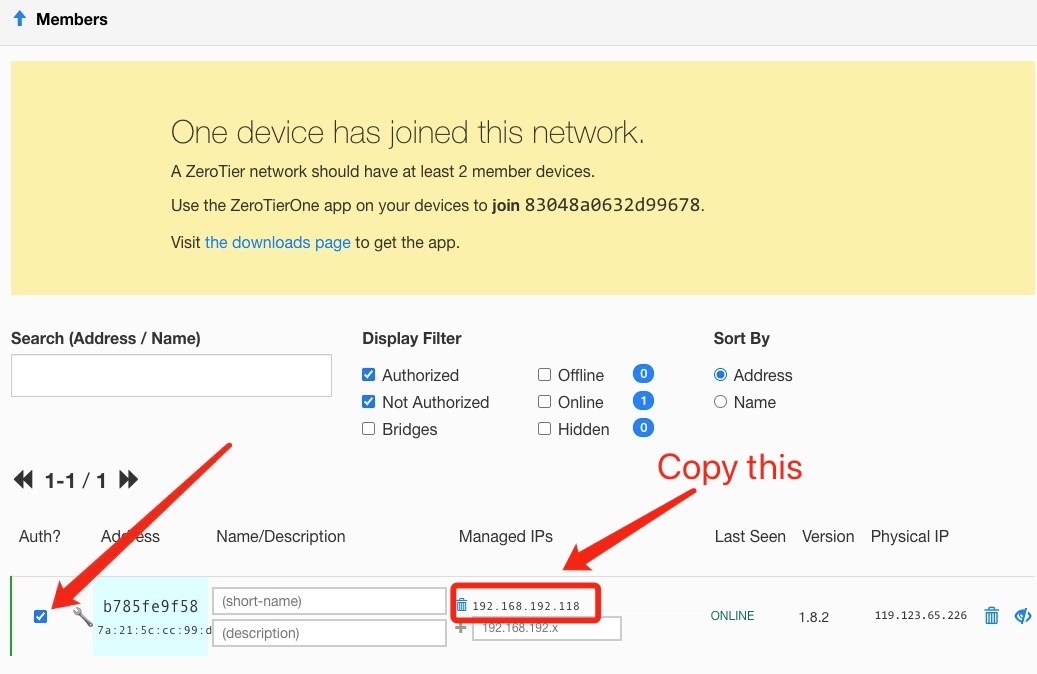
- D. Lisa marsruudid Cudy ruuterile.

5. Paigaldage ZeroTier rakendus
Laadige alla ja installige ZeroTier App kõikidele masinatele, mida soovite ühendada.
6. Ühendage masinad võrku
Kui ZeroTier rakendus töötab, klõpsake nuppu Join Network
Sisestage võrgu ID sammust 2 ja klõpsake nuppu Join. Kui olete loonud avaliku võrgu, peaks nüüd olema ühendatud. Kui lõite privaatse võrgu, peate iga masina ZeroTier'i kasutajaliideses heaks kiitma (vt samm 2).
7. Kontrollige ühenduvust
Kontrollige, kas ühendus on õnnestunud, klõpsates ZeroTier'i rakenduses nupule Show Network (Näita võrku). Status peaks näitama OK ja ruut Connected peaks olema märgitud. Ühenduse kontrollimiseks võite proovida ka teise masina privaatse IP-aadressi pingitamist.
8. Kaugjuurdepääs
Sellest saate kaugjuurdepääsu cudy ruuterile kasutada 192.168.10.1 (192.168.192.118) või alamvõrku 192.168.10.xxx.
129 kommentaari
@Dear David Esteban,
Our technical support has sent you the new beta firmware via email. Please update and
check.
“Subject: LT500 V3.0 – Static routing over VPN (ZeroTier) interface
Hello Cudy Support,
I have an LT500 with the following details:
- Hardware: LT500 V3.0
- Firmware: 2.4.16-20250804-150319
I use it as a ZeroTier master in a site-to-site setup with two Cudy X6 routers. On the X6 and on the LT500 V2.0 emulator (FW 2.1.1-20240419), the Static Routing page lets me choose the “VPN” interface, so I can route remote subnets through the ZeroTier tunnel.
On my LT500 V3.0, the Static Routing interface list only shows WAN, LAN, WISP, GUEST and 4G. Without the VPN option I cannot route traffic to the remote networks through ZeroTier, which also breaks access when the router fails over to 4G.
Could you please tell me if there is a firmware for LT500 V3.0 (official or beta) that allows selecting the VPN/ZeroTier interface in Static Routing? If so, I would appreciate it if you could send it to me.
Thank you very much.
Best regards,
David"
@Dear Bolesław,
Our technical support has contacted you via email. Please check.
“Hi, could you share the firmware for my router (WR3000 V1.0 router currently running firmware:
2.4.19-20250828-192837), which support ZeroTier?
Best regards!”
@Dear Fajar,
Our technical support has sent you the firmware via email. Please check.
““Hi,
Please can you send me the firmware for WR3000 V1.0 with ZeroTier?
Regards””
Subject: LT500 V3.0 – Static routing over VPN (ZeroTier) interface
Hello Cudy Support,
I have an LT500 with the following details:
- Hardware: LT500 V3.0
- Firmware: 2.4.16-20250804-150319
I use it as a ZeroTier master in a site-to-site setup with two Cudy X6 routers. On the X6 and on the LT500 V2.0 emulator (FW 2.1.1-20240419), the Static Routing page lets me choose the “VPN” interface, so I can route remote subnets through the ZeroTier tunnel.
On my LT500 V3.0, the Static Routing interface list only shows WAN, LAN, WISP, GUEST and 4G. Without the VPN option I cannot route traffic to the remote networks through ZeroTier, which also breaks access when the router fails over to 4G.
Could you please tell me if there is a firmware for LT500 V3.0 (official or beta) that allows selecting the VPN/ZeroTier interface in Static Routing? If so, I would appreciate it if you could send it to me.
Thank you very much.
Best regards,
David
Hi, could you share the firmware for my router (WR3000 V1.0 router currently running firmware:
2.4.19-20250828-192837), which support ZeroTier?
Best regards!