
Port Forwards (Port forwarding) feature allows remote computers on the Internet to connect to a specific computer or service within the private LAN.
Different services use different service ports, please verify the service port number before the configuration.
Important:
Make sure the Cudy router gets a Public IP (WAN IP) from your Internet Service Provider, if it’s a Private IP address that means there is another NAT device in front of Cudy. You need to open the service ports on that device as well.
For how to verify the IP Address is a public one or private one, please refer to this link:
http://en.wikipedia.org/wiki/Private_network
How to check the WAN IP of Cudy?
Wireless Router & Mesh (System Status->WAN->Status)

4/5 Router (System Status->Cellular/4G->Status)

Note:
1. Usually, if the Public IP and IP Address are the same, it means you've got a Public IP. The IP Address is the WAN IP Address you get from your Internet Service Provider. The Public IP above is the IP Address the other device can find you over internet. So if the Cudy router gets private IP address, you need to figure out which device use this Public IP and open ports on it.
2. For most of the cellular router, the internet service provider usually gives the private IP Address. So, if you want to do the port forwards, please contact your internet service provider to assign you a public IP address or do the port forwarding in their part.
Step 1: Open a web browser and go to http://cudy.net or http://192.168.10.1.
For details, please refer to How to log into the web interface of Cudy Router?
Step 2: Click Advanced Settings -> Port Forwards in the Network section.

Step 3: Click Add to append one entry to the list. Input the parameters as you want into the field as below.
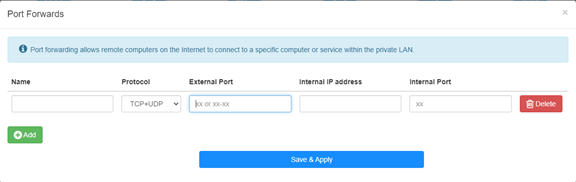
For example: According to the following configure, TCP port 5000, UDP port 5001 and both TCP/UDP port 6000 of host 192.168.10.18 will be opened to the internet.

Name:
Name of the entry, used to facilitate memory
Protocol:
TCP, UDP or TCP+UDP
External Port:
Service port on the WAN side which can be accessed to from the internet
Internal IP address:
IP address of the host, which will open the port to the internet
Internal Port:
Service port of the host in the LAN
Note:
Generally, internal port is the same as the external port.
Step 4: Click 'Save & Apply' to save the settings.
Go to the Status page and check the WAN IP Address of the router. Now you can try to use the http:// WAN IP: port number to visit the service you have opened.
42 comentarios
@Dear Damon Jaggers,
What is the working mode you set? If you set it on Access Point mode, the router will not support these function. There is also no need to support these functions. If you want these functions, you can set it working on Wireless Router mode.
“Hi, I have a cudy AX3000 mesh system and none of this is available to me, am I missing something? My wifi is setup but do not have access to ipv6 or even UPnP specifically for gaming.”
Hi, I have a cudy AX3000 mesh system and none of this is available to me, am I missing something? My wifi is setup but do not have access to ipv6 or even UPnP specifically for gaming.
@Dear Alberto,
Cudy routers don’t support this feature now. We will provide your feedback to the product department for evaluation to add this feature.
“Hi. In my previous router, I could set these features by specifying IPV6 addresses, but Cudy BE M11000 doesn’t allow this; it only allows IPV4. Will you be updating to include IPV6 addresses?”
Hi. In my previous router, I could set these features by specifying IPV6 addresses, but Cudy BE M11000 doesn’t allow this; it only allows IPV4. Will you be updating to include IPV6 addresses?
Please provide the lt500 settings to change the nat type for use with the ps5 console.