
MAC Filter is a technology used in wireless routers to prevent unauthorized access to networks. The MAC Address is a unique identifier that is assigned to each device on a network. A wireless router uses a MAC Address to identify the device and determine which network it should connect to.
Step 1: Open a web browser and go to http://cudy.net or http://192.168.10.1.
For details, please refer to How to log into the web interface of Cudy Router?
Step 2: Click Advanced Settings -> MAC Filter in the Security section.

Step 3: Check settings in MAC Filter page.

• To block the specific device(s)
1. Select 'Allow all except list'.
2. Select the device(s) to be blocked in the online device list regarding the MAC Address and IP Address.


If the online device you want to block is not there, go to System Status->Devices->copy the MAC Address->go back to MAC Filter->Custom and paste MAC Address.
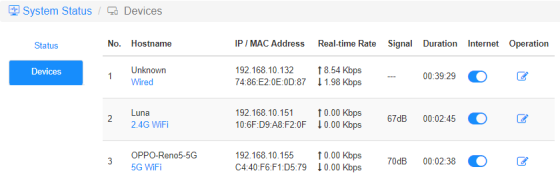
3. Save & Apply and the device selected will not be able to get internet from the router anymore.
• To allow the specific device(s)
1. Select 'Allow list only'.
2. Select the device(s) you allow getting internet.

3. Save & Apply and only the devices(s) selected can get internet access.
Here is a simple way can do the same as MAC Filter.
Internet
Enable and disable the Internet icon to control the internet access of each device.
'OPPO-Reno5-5G' cannot get internet via the router below.

Operation
Click on the Operation icon can specify a new name for the device.

Time restriction of internet access
The time period that devices are allowed to access the Internet.
Example: The 'Computer' device is only allowed to enjoy the internet on Monday from 10 am to 8 pm.


12 comentarios
@Dear tonalt,
Our technical support has sent you the solutions via email. Please check.
“it seems that an activated mac-filter also has an effect on the guest-network in the sense that the router doesn’t connect a guest to the internet! LT700E.
i think most people don’t like this and even worse: the activated mac filter on the guest network is not editable and it even worser it doesn’t use the mac table that is defined for the main wifi network.
so the mac filter is completely useless if one allows a guest-network.
probably i am wrong and the guest network can connect a guest to the internet with an activated mac-filter. but if so, please tell what i can do, to achieve this.”
it seems that an activated mac-filter also has an effect on the guest-network in the sense that the router doesn’t connect a guest to the internet! LT700E.
i think most people don’t like this and even worse: the activated mac filter on the guest network is not editable and it even worser it doesn’t use the mac table that is defined for the main wifi network.
so the mac filter is completely useless if one allows a guest-network.
probably i am wrong and the guest network can connect a guest to the internet with an activated mac-filter. but if so, please tell what i can do, to achieve this.
@Dear William and Dragan,
Thank you for your kindly advice! We will provide your feedback to the product department for evaluation. In fact, we already have this plan to develop this feature.
“I completely agree with William. I just can’t believe this kind of oversight was made. MAC filtering still hasn’t been added to the latest firmware 2.3.12. Please update the firmware and give us that function.”
“I just bought the Cudy WR11000 WiFi 7 Router and want to use it as an Access Point with MAC Filtering. But I just found out that there is no way to enable MAC Filtering when it is in Access Point mode. Why? You need to allow MAC Filtering in Access Point mode Not just only in Router mode! Please update the firmware and give us that function. I am on the latest firmware version 2.2.19.”
mine is WR3600
I completely agree with William. I just can’t believe this kind of oversight was made. MAC filtering still hasn’t been added to the latest firmware 2.3.12. Please update the firmware and give us that function.