
MAC Filter is a technology used in wireless routers to prevent unauthorized access to networks. The MAC Address is a unique identifier that is assigned to each device on a network. A wireless router uses a MAC Address to identify the device and determine which network it should connect to.
Step 1: Open a web browser and go to http://cudy.net or http://192.168.10.1.
For details, please refer to How to log into the web interface of Cudy Router?
Step 2: Click Advanced Settings -> MAC Filter in the Security section.

Step 3: Check settings in MAC Filter page.

• To block the specific device(s)
1. Select 'Allow all except list'.
2. Select the device(s) to be blocked in the online device list regarding the MAC Address and IP Address.


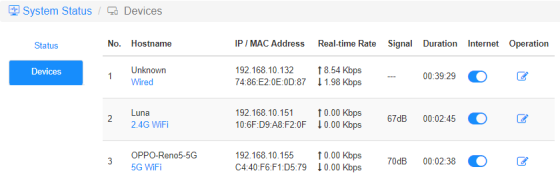
If the online device you want to block is not there, go to System Status->Devices->copy the MAC Address->go back to MAC Filter->Custom and paste MAC Address.
3. Save & Apply and the device selected will not be able to get internet from the router anymore.
• To allow the specific device(s)
1. Select 'Allow list only'.
2. Select the device(s) you allow getting internet.

3. Save & Apply and only the devices(s) selected can get internet access.
Here is a simple way can do the same as MAC Filter.
Internet
Enable and disable the Internet icon to control the internet access of each device.
'OPPO-Reno5-5G' cannot get internet via the router below.

Operation
Click on the Operation icon can specify a new name for the device.

Time restriction of internet access
The time period that devices are allowed to access the Internet.
Example: The 'Computer' device is only allowed to enjoy the internet on Monday from 10 am to 8 pm.


12 comments
I just bought the Cudy WR11000 WiFi 7 Router and want to use it as an Access Point with MAC Filtering. But I just found out that there is no way to enable MAC Filtering when it is in Access Point mode. Why? You need to allow MAC Filtering in Access Point mode Not just only in Router mode! Please update the firmware and give us that function. I am on the latest firmware version 2.2.19.
@Уважаемый Руслан,
Благодарим вас за любовь и добрый отзыв. Мы планируем добавить эту функцию в будущем.
“Здравствуйте!
Спасибо вам за то, что выпускаете такие отличные устройства, как WR3000H. Я использую их как дома, так и на работе — полностью доволен их работой.
Однако столкнулся с одной особенностью: отсутствием фильтрации по MAC-адресам в режиме точки доступа. Был удивлен, так как у устройств других производителей такая функция в режиме точки доступа присутствует.
Можно ли ожидать, что фильтрация по MAC-адресам появится в будущих версиях прошивки для режима точки доступа?”
Здравствуйте!
Спасибо вам за то, что выпускаете такие отличные устройства, как WR3000H. Я использую их как дома, так и на работе — полностью доволен их работой.
Однако столкнулся с одной особенностью: отсутствием фильтрации по MAC-адресам в режиме точки доступа. Был удивлен, так как у устройств других производителей такая функция в режиме точки доступа присутствует.
Можно ли ожидать, что фильтрация по MAC-адресам появится в будущих версиях прошивки для режима точки доступа?
@Андрей
Уважаемый клиент,
Спасибо, что обратились в службу поддержки Cudy.
Многие функции, связанные с маршрутизатором, исчезнут, если вы настроите маршрутизатор на работу в режиме точки доступа, усилителя сигнала и клиента. Вам необходимо настроить его на работу в режиме беспроводного маршрутизатора или WISP, тогда вы увидите эти функции, связанные с маршрутизатором.
“У меня роутер TR1200 v1.0. Обновился до прошивки 2.3.7. И все равно в меню Расширенные настройки в Разделе Безопасность Только 2 пункта- Wps и Расписание WiFi. На картинках много возможностей.”
У меня роутер TR1200 v1.0. Обновился до прошивки 2.3.7. И все равно в меню Расширенные настройки в Разделе Безопасность Только 2 пункта- Wps и Расписание WiFi. На картинках много возможностей.