
This article is applied in the following situation: When you connect to the 4G router's Wi-Fi, none of your device could get internet access.
Situation 1: SIM card cannot be detected

Possibility:
1. SIM card is not matched or destroyed.
2. SIM card slot's issue on router.
Troubleshooting:
1. Install SIM card properly and make sure it has a good contact with the SIM card slot.
2. Try another SIM card.
3. Power off your Cudy router, then remove the SIM card and clean the card with a soft cloth or rubber. Insert to the SIM slot in the correct direction. When the SIM card is pushed to the correct position, you will hear a sound of "Di Da". Power on your Cudy router and try again.
What can I do if Cudy LT500 prompts SIM Detached?
Situation 2: Internet status and Cellular are not connected

Possibility:
1. The 4G router’s default APN profile doesn’t match with the SIM card.
2. IMEI binding with particular device.
3. Network signal weak or LTE antennas destroyed.
4. The SIM card may owe the fee or do not have data.
5. SIM card’s supporting bands doesn’t match with Cudy 4G router.
Troubleshooting:
1. Contact your carrier to confirm the APN setting or insert the same SIM card into the phone and find APN from the phone.
Then log into the web management page of Cudy router and set the APN manually and change the Network mode to 4G only.
(General Settings->Cellular->APN)


2. Remove the IMEI binding with your carrier.
3. Relocate the router in a suitable place to get better 4G signal.
If you know the band of your SIM card can use, please enable "Band Select" and choose the exact Bands to get a good connection.
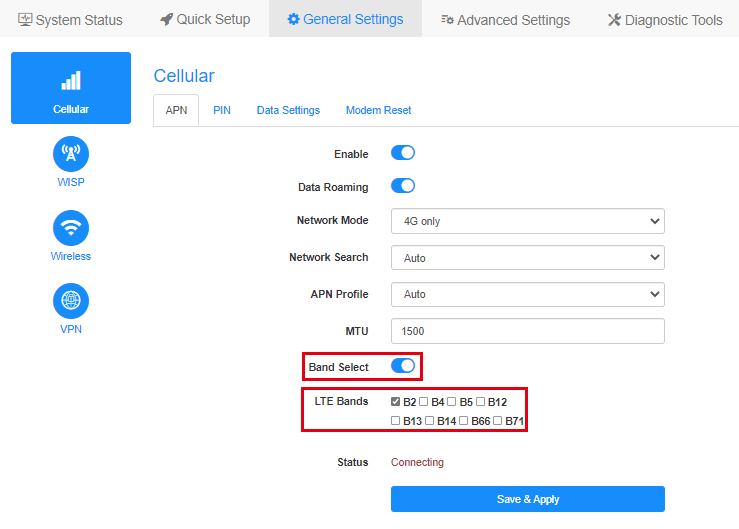
Note: If wrong Bands are selected, 4G connection will fail.
4. Insert the same SIM card into mobile phone.
5. Try a different SIM card especially from different carriers.
6. Please check with your carrier which network type and bands are supported by your SIM card, then compare it with the network type and bands supported by Cudy device. You could check specification of the Cudy device on our Official website, for example, here is the network type and bands supported by LT500:

7. Upgrade the firmware to the latest version.
Where to upgrade: Download Center
How to upgrade: How to upgrade firmware of Cudy Router?
If the SIM card is activated and could work on another device. Please contact support@cudy.com with what troubleshooting you have done and the information below.
a. A screenshot of the System Status page.
b. Your Carrier name and Data Plan name.
c. Go to Diagnostic Tools->Diagnosis, click on GO and save the bin. file.
d. Go to Diagnostic Tools->System Log->Download.
Situation 3: Internet status is not connected, Cellular is connected

Possibility:
The 4G router’s default APN profile doesn’t match with the SIM card.
Troubleshooting:
1. Contact your carrier to confirm the APN setting or insert the same SIM card into the phone and find APN from the phone.
Then log into the web management page of Cudy router and set the APN manually and change the Network mode to 4G only.
(General Settings->Cellular->APN)
2. Upgrade the firmware to the latest version.
Where to upgrade: Download Center
How to upgrade: How to upgrade firmware of Cudy Router?
If the SIM card is activated and could work on another device. Please contact support@cudy.com with what troubleshooting you have done and the information below.
a. A screenshot of the System Status page.
b. Your Carrier name and Data Plan name.
c. Go to Diagnostic Tools->Diagnosis, click on GO and save the bin. file.
d. Go to Diagnostic Tools->System Log->Download.
40 comments
@Cara Francesca,
il nostro supporto tecnico ti ha contattata via e-mail. Ti preghiamo di controllare.
“Salve, da due giorni il router mi dice che manca il segnale dns e non riesco a poter utilizzare Internet posso capire come risolvere se posso chiamare un numero telefonico? Grazie”
Salve, da due giorni il router mi dice che manca il segnale dns e non riesco a poter utilizzare Internet posso capire come risolvere se posso chiamare un numero telefonico? Grazie
@Dear Julia,
Our technical support has contacted you via email. Please check.
“I have issues with my router. I introduced a SIM after checking if everything worked on my phone but when I try to use it with the router it won’t work, the blue dot does light up but when connected I get the “No Connection” message.”
I have issues with my router. I introduced a SIM after checking if everything worked on my phone but when I try to use it with the router it won’t work, the blue dot does light up but when connected I get the “No Connection” message.
@Dear Jeanet,
Our technical support has sent you the solutions via email. Please check.
“My WiFi is connected but it says no internet”