
Маршрутизаторы Cudy имеют встроенный веб-интерфейс, и эта внутренняя веб-страница не требует доступа в Интернет. Вы можете подключить свое устройство к маршрутизатору Cudy через Wi-Fi или Ethernet, чтобы войти на страницу веб-управления.
Шаг 1. Подключите компьютер к маршрутизатору Cudy через Беспроводное соединение или Проводное соединение.
Если Беспроводная связь: имя Wi-Fi по умолчанию и пароль напечатан на нижней этикетке маршрутизатора.
Если проводное: подключите компьютер к одному из < Strong data-mce-fragment="1">Порты LAN на задней панели маршрутизатора через кабель Ethernet.
Шаг 2. Откройте веб-браузер (Google, Firefox и т. д.) и введите http:/ /cudy.net или http ://192.168.10.1 в адресной строке.
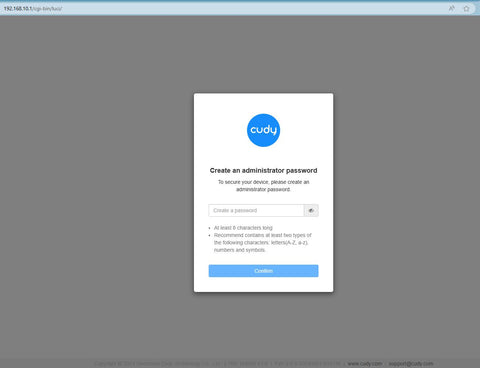
Шаг 3. Откроется приведенная ниже страница входа. . Выберите язык отображения страницы веб-управления и запрошенный пароль: «admin или создайте один пароль.

Устранение неполадок:
Если страница входа не отображается, попробуйте выполнить следующие действия по устранению неполадок:
1. Убедитесь, что http://cudy.net или http://192.168 .10.1 вводит в адресную строку, а не в строку поиска.
2. Если на компьютере установлен статический IP-адрес, измените его настройки, чтобы автоматически получать IP-адрес и адрес DNS-сервера.
3. Используйте другой веб-браузер и повторите попытку.
4. Меняйте разные клиентские устройства.
5. Перезагрузите или перезагрузите маршрутизатор и проверьте еще раз.
Как выполнить сброс: при включенном питании нажмите и удерживайте кнопку/отверстие сброса в течение 8 секунд.< /п>
6. Очистите файлы cookie вашего браузера.
7. Отключите и включите используемый сетевой адаптер.
Комментариев: 254
@Marlon,
Dear Customer,
Thank you for contacting Cudy support team.
Please check if you connect the WAN port of the Cudy router to the LAN port of TP-LINK? If not, please change to WAN port of the Cudy router.
“I have a Cudy wireless router however I cannot signin to the Cudy page to setup the network. I have a eero router connected to an 8 port tp link and one port from the tplink connected to the Cudy Router. I cannot sign into the Cudy nextwork page when I specify the correct Ip address. Thank you”
I have a Cudy wireless router however I cannot signin to the Cudy page to setup the network. I have a eero router connected to an 8 port tp link and one port from the tplink connected to the Cudy Router. I cannot sign into the Cudy nextwork page when I specify the correct Ip address. Thank you
@George
Dear George,
Thank you for contacting Cudy support team.
Our technical support has contacted you via email. Please check.
“After upgrading to latest firmware my WR1200 v.2 I can use the webui only from wifi network the password doesnt work anymore from the wan.Can you help me ?”
After upgrading to latest firmware my WR1200 v.2 I can use the webui only from wifi network the password doesnt work anymore from the wan.Can you help me ?
@David
Dear customer,
Thank you for contacting Cudy support team. I need some more information to fix this issue.
1. What is the model of your router? You can check the model on the label at the bottom of the router.
2. What are the passwords for? WiFi password? Administrator password? or other?
Did you try to reset the router to factory default by long pressing the reset button for about 3 seconds? You can release the reset button when the LED flashes. The default password of the WEB panel will recover to default “admin”. If the firmware version is 2.×.x, you need to create a new password when first login to the web page of the router. The WiFi password will recover to factory default which is printed on the label.
“I’m failing to reset my passwords may u please help me with this”