
La fonction de transfert de port (Port Forwarding) permet aux ordinateurs distants sur Internet de se connecter à un ordinateur ou à un service spécifique au sein du réseau local privé.
Différents services utilisent différents ports de service, veuillez vérifier le numéro de port de service avant la configuration.
Important:
Assurez-vous que le routeur Cudy reçoit une adresse IP publique (IP WAN) de votre fournisseur d'accès à Internet. S'il s'agit d'une adresse IP privée, cela signifie qu'un autre périphérique NAT se trouve devant Cudy. Vous devez également ouvrir les ports de service sur ce périphérique.
Pour savoir comment vérifier que l'adresse IP est publique ou privée, veuillez vous référer à ce lien :
http://en.wikipedia.org/wiki/Private_network
Comment vérifier l'IP WAN de Cudy ?
Routeur sans fil et maillage (État du système -> WAN -> État)

Routeur 4/5 (État du système -> Cellulaire/4G -> État)

Note:
1. Généralement, si l'adresse IP publique et l'adresse IP sont identiques, cela signifie que vous disposez d'une adresse IP publique. L'adresse IP est l'adresse IP WAN fournie par votre fournisseur d'accès à Internet. L'adresse IP publique ci-dessus est l'adresse IP que l'autre appareil peut vous trouver sur Internet. Ainsi, si le routeur Cudy obtient une adresse IP privée, vous devez identifier l'appareil qui utilise cette adresse IP publique et ouvrir des ports sur celle-ci.
2. Pour la plupart des routeurs cellulaires, le fournisseur d'accès à Internet fournit généralement une adresse IP privée. Par conséquent, si vous souhaitez effectuer des redirections de port, veuillez contacter votre fournisseur d'accès à Internet pour qu'il vous attribue une adresse IP publique ou qu'il effectue la redirection de port lui-même.
Étape 1:Ouvrez un navigateur Web et accédez àhttp://cudy.netouhttp://192.168.10.1.
Pour plus de détails, veuillez vous référer àComment se connecter à l’interface Web de Cudy Router ?
Étape 2: CliquezParamètres avancés -> Redirections de portdans leRéseausection.

Étape 3 :CliquezAjouterPour ajouter une entrée à la liste, saisissez les paramètres souhaités dans le champ ci-dessous.
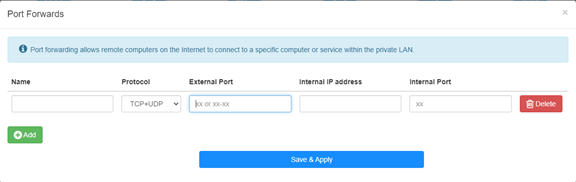
Par exemple:Selon la configuration suivante, le port TCP 5000, le port UDP 5001 et les deux ports TCP/UDP 6000 de l'hôte 192.168.10.18 seront ouverts sur Internet.

Nom:
Nom de l'entrée, utilisé pour faciliter la mémoire
Protocole:
TCP, UDP ou TCP+UDP
Port externe:
Port de service côté WAN accessible depuis Internet
Adresse IP interne:
Adresse IP de l'hôte, qui ouvrira le port vers Internet
Port interne :
Port de service de l'hôte dans le LAN
Note:
En général, le port interne est le même que le port externe.
Étape 4: Cliquez sur 'Enregistrer et appliquer' pour enregistrer les paramètres.
Accédez à la page d'état et vérifiez l'adresse IP WAN du routeur. Vous pouvez maintenant essayer d'utiliser le numéro de port http:// WAN IP: pour accéder au service que vous avez ouvert.
42 commentaires
@Dear FRANCISCO,
Yes, port forwarding is limited to a single internal IP address. You can’t set like this.
“I have a question: Is port forwarding limited to a single internal IP address, or can the same port be opened for multiple internal IP addresses? For example, if I need to open port 443 for the internal address 192.168.10.5, and also for 192.168.10.8, how would I do that?”
I have a question: Is port forwarding limited to a single internal IP address, or can the same port be opened for multiple internal IP addresses? For example, if I need to open port 443 for the internal address 192.168.10.5, and also for 192.168.10.8, how would I do that?
@Dear Elshad,
Please enable the Remote Management function on the “Advanced Settings” -“System” -“Administrator” function page. Then you can try to login to the web page of the router from internet via the HTTPS protocol. You must use https://WAN IP address to access the management page. Not the HTTP.
“Dear support team.
I have 4G LTE N300 WiFi Routur
I get Public Static IP from Mobil operator but I can not reach from outside to my Cudy device 80 port.
I opened WEB 80 port
I tried from Port Forwarding side to add IP address of the Cudy 4G Routur IP address but can not reach outside internet to the Cudy modem.
Please support to solve this issue."
Dear support team.
I have 4G LTE N300 WiFi Routur
I get Public Static IP from Mobil operator but I can not reach from outside to my Cudy device 80 port.
I opened WEB 80 port
I tried from Port Forwarding side to add IP address of the Cudy 4G Routur IP address but can not reach outside internet to the Cudy modem.
Please support to solve this issue.
@Estimado Fran:
La dirección IPv4 celular es privada. Por lo tanto, no se puede acceder desde internet. Te sugiero usar la VPN Zerotier, que permite pasar la NAT. Aquí tienes las instrucciones.
https://www.cudy.com/blogs/faq/how-to-remote-connect-cudy-router-via-zerotier?pos=1&_sid=5ecdb2fb9&ss=r
Tengo un LT 500, la interfaces no es como esta , me dice wan / vpn y también tengo cliente wireguard ,como pudiera hacer, porque la ip addres y la publica son diferentes