
This article is applied in the following situation: When you connect to the 4G router's Wi-Fi, none of your device could get internet access.
Situation 1: SIM card cannot be detected

Possibility:
1. SIM card is not matched or destroyed.
2. SIM card slot's issue on router.
Troubleshooting:
1. Install SIM card properly and make sure it has a good contact with the SIM card slot.
2. Try another SIM card.
3. Power off your Cudy router, then remove the SIM card and clean the card with a soft cloth or rubber. Insert to the SIM slot in the correct direction. When the SIM card is pushed to the correct position, you will hear a sound of "Di Da". Power on your Cudy router and try again.
What can I do if Cudy LT500 prompts SIM Detached?
Situation 2: Internet status and Cellular are not connected

Possibility:
1. The 4G router’s default APN profile doesn’t match with the SIM card.
2. IMEI binding with particular device.
3. Network signal weak or LTE antennas destroyed.
4. The SIM card may owe the fee or do not have data.
5. SIM card’s supporting bands doesn’t match with Cudy 4G router.
Troubleshooting:
1. Contact your carrier to confirm the APN setting or insert the same SIM card into the phone and find APN from the phone.
Then log into the web management page of Cudy router and set the APN manually and change the Network mode to 4G only.
(General Settings->Cellular->APN)


2. Remove the IMEI binding with your carrier.
3. Relocate the router in a suitable place to get better 4G signal.
If you know the band of your SIM card can use, please enable "Band Select" and choose the exact Bands to get a good connection.
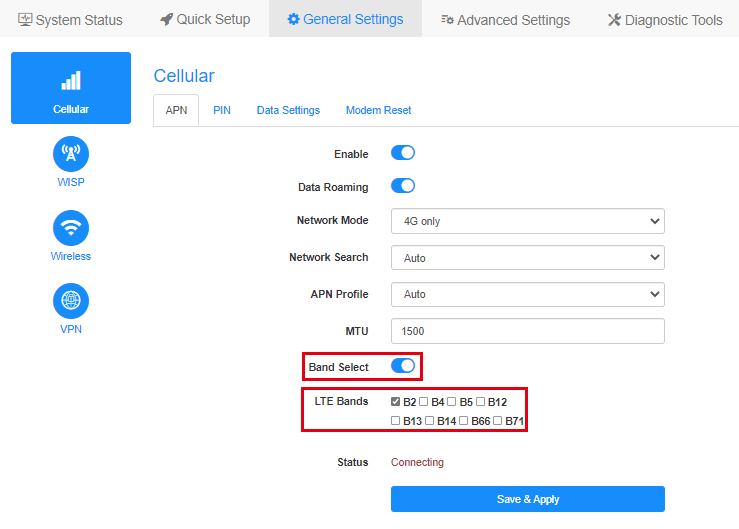
Note: If wrong Bands are selected, 4G connection will fail.
4. Insert the same SIM card into mobile phone.
5. Try a different SIM card especially from different carriers.
6. Please check with your carrier which network type and bands are supported by your SIM card, then compare it with the network type and bands supported by Cudy device. You could check specification of the Cudy device on our Official website, for example, here is the network type and bands supported by LT500:

7. Upgrade the firmware to the latest version.
Where to upgrade: Download Center
How to upgrade: How to upgrade firmware of Cudy Router?
If the SIM card is activated and could work on another device. Please contact support@cudy.com with what troubleshooting you have done and the information below.
a. A screenshot of the System Status page.
b. Your Carrier name and Data Plan name.
c. Go to Diagnostic Tools->Diagnosis, click on GO and save the bin. file.
d. Go to Diagnostic Tools->System Log->Download.
Situation 3: Internet status is not connected, Cellular is connected

Possibility:
The 4G router’s default APN profile doesn’t match with the SIM card.
Troubleshooting:
1. Contact your carrier to confirm the APN setting or insert the same SIM card into the phone and find APN from the phone.
Then log into the web management page of Cudy router and set the APN manually and change the Network mode to 4G only.
(General Settings->Cellular->APN)
2. Upgrade the firmware to the latest version.
Where to upgrade: Download Center
How to upgrade: How to upgrade firmware of Cudy Router?
If the SIM card is activated and could work on another device. Please contact support@cudy.com with what troubleshooting you have done and the information below.
a. A screenshot of the System Status page.
b. Your Carrier name and Data Plan name.
c. Go to Diagnostic Tools->Diagnosis, click on GO and save the bin. file.
d. Go to Diagnostic Tools->System Log->Download.
40 comments
@Dear Aleksey,
Our technical support has contacted you via email. Please check.
“The Cudy N-300 v 2.0 router lacks a cellular connection, displaying a message stating that 4G is not connected. The connection level indicators on the back of the router are unlit. SIM cards from any carriers do not work. None of the official firmware updates available for the router resolves the issue.”
The Cudy N-300 v 2.0 router lacks a cellular connection, displaying a message stating that 4G is not connected. The connection level indicators on the back of the router are unlit. SIM cards from any carriers do not work. None of the official firmware updates available for the router resolves the issue.
@Dear KELVIN,
Please try to reset the router to factory default by long pressing the reset button for about 3 seconds. You can release the reset button when the LED flashes. Then reinstall the router and check if the problem remains?
If the problem remains, you still can’t find the Cellular page. Then the router is faulty. You can contact the seller to requesta warranty.
“Cellular option is missing on cudy router and it says 4g is not connected”
Cellular option is missing on cudy router and it says 4g is not connected
@Lieber HW,
Entschuldigung für die späte Antwort aufgrund des chinesischen Frühlingsfestes! Funktioniert der LT300 wieder normal, wenn Sie das 12-V-Netzteil wieder verwenden?
“Keine Internetverbindung bei Verwendung des Cudy 4G-Routers mit eingelegter SIM-Karte
Ich habe einen LT300 der dieses Problem hatte und einen WR300 zum erweitern des wlan. Einmal hatte ich das Netzteil vom WR300 am LT300. Das passt, hat aber statt 12 V nur 5 V. Dann geht am LT300 das wlan , lan , webaccess alles, nur das 4G nicht …. Da muss man erst mal drauf kommen …"