


Amazon A+ Content


Wired. Powered. Reliable.
Shielded 2.5 Gbps Ethernet Port
Wired. Powered. Reliable.
Shielded 2.5 Gbps Ethernet Port
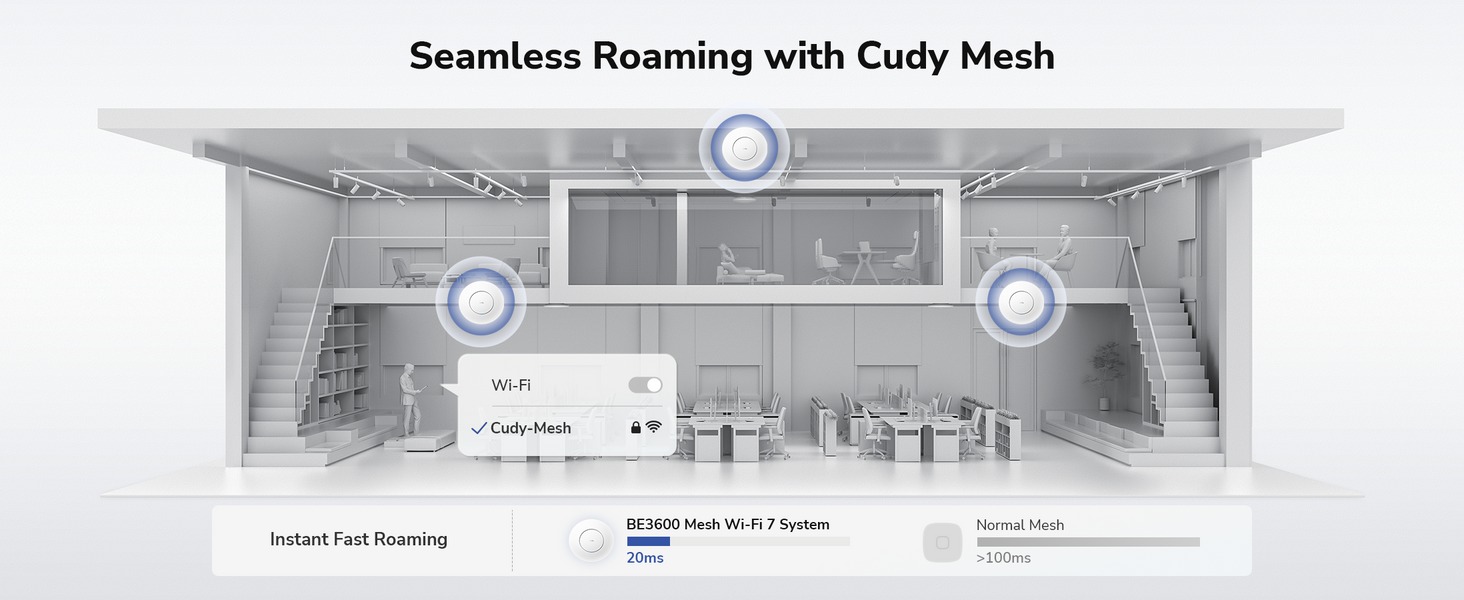

Seamless Wi-Fi for Everywhere

Campus

Hospitality

Conference Center

Shopping Mall
Advanced Business Features

Band Steering

Auto Channel Selection

Auto Mesh Optimization

Central Management
Versatile Powering and Installation

Flexible PoE/DC Power Options

Versatile Mounting

Centralized AP Management
Centralized AP Management
| Model Version | ||
|---|---|---|
| Model Version | AP3600 1.0 | |
| CPU | ||
| CPU | CPU Details | 2.0 GHz Quad-Core, ARM Cortex-A7 |
| Memory/Storage | ||
| Memory/Storage | Flash/ROM | 128 MB (1 Gbit) NAND |
| DDR/RAM | 512 MB (4 Gbit) DDR3L | |
| Wireless | ||
| Wireless | MLO Speeds | 3570 Mbps |
| 5 GHz Wi-Fi Speed | 2882 Mbps | |
| 2.4 GHz Wi-Fi Speed | 688 Mbps | |
| 5 GHz Wi-Fi Streams | 2 Spatial Streams | |
| 2.4 GHz Wi-Fi Streams | 2 Spatial Streams | |
| Wi-Fi Antennas | 4× Internal | |
| FEM or PA/LNA | 5 GHz: 2× Internal, 2.4 GHz: 2× Internal | |
| Beamforming | ||
| Range Performance |
Max: 220 m (722 ft) Tested in open-space environments with minimal interference. Actual WiFi range may vary depending on layout and wall materials. Refer to the Wall Performance specifications for placement suggestions. |
|
| Wall Performance |
Two wooden walls with thickness < 10 cm (4'') One concrete wall with thickness < 20 cm (7'') or two concrete walls with thickness < 10 cm (4'') |
|
| Interfaces | ||
| Interfaces | 2.5G RJ45 Ports | 1 |
| Gigabit RJ45 Ports | 1 | |
| Ethernet Notes | ETH0: PoE In | |
| Buttons and LEDs | ||
| Buttons and LEDs | LED | System |
| Physical Buttons | Reset Button | |
| Power | ||
| Power | Power Input Type |
|
| Power Methods |
|
|
| Power Input |
|
|
| Max Power Consumption (W) | 10W | |
| Power Adapter In the Box |
AP3600 | No adapter in the box AP3600_P | PoE adapter in the box: Input: 100-240V~, 50/60Hz Output: 48V⎓ Passive PoE |
|
| Reliability | ||
| Reliability | Advanced | Hardware Watchdog |
| EMC | ESD: Contact: 4kV; Air: 8kV | |
| Environment |
|
|
| Certifications | ||
| Certifications | FCC, CE | |
| Mechanical | ||
| Mechanical | Installation |
|
| Dimension |
231.9×231.9×57.1 mm 9.13×9.13×2.25 inches |
|
| Product Weight |
|
|
| Package Content | ||
| Package Content |
|
|
| Ordering Information | ||
| Ordering Information | Retail Package Weight |
|
| Retail Package Dimension |
310×238×73 mm 12.2×9.37×2.87 inches |
|
| Units per Carton | 10 | |
| Carton Net Weight |
|
|
| Carton Gross Weight |
|
|
| Carton Dimension |
49.5×38.7×33.2 cm 19.49×15.24×13.07 inches |
|
| Compatibility | ||
| Compatibility | Compatible Products | C200P 1.0, C500P 1.0 |
| Compatible Accessories | POE200H 1.0, POE52-30W 1.0, POE48-18W 1.0 | |
| Note | Choose with caution: some suggested models may not deliver speeds that match the device’s maximum capability. | |
| Model Version | ||
|---|---|---|
| Model Version | AP3600 1.0 | |
| Wireless | ||
| Wireless | Wi-Fi Standards | Wi-Fi 7 |
| Max Wi-Fi Modulation | 4K-QAM | |
| Wi-Fi Efficiency |
|
|
| Max Capacity | 512 | |
| Recommended Client Upper Limit | 200 | |
| Wi-Fi Channel Width | Auto/20/40/80/160 MHz | |
| Wi-Fi Security | WPA/WPA2/WPA3 | |
| Multi-SSID (Max Number) | 8 SSIDs (Up to 4 SSIDs on each band), VLAN Support | |
| WPS | ||
| General | ||
| General | Operation Modes |
|
| Mesh | Cudy Mesh | |
| Mesh Backhaul |
|
|
| Multi-Band Backhaul | ||
| WAN Mode |
|
|
| Management | ||
| Management | Multi-AP Management | Via Cudy AP Controller |
| All Devices Management |
|
|
| Per-Devices Management |
|
|
| Content Management |
|
|
| Network | ||
| Network | QoS | Per-User Rate Limiting |
| DHCP |
|
|
| IP Versions | IPv4/IPv6 | |
| IPv6 Protocols |
|
|
| Multicast | ||
| IPTV/VLAN | Tag VLAN | |
| TTL Customization |
|
|
| IGMP |
|
|
| Forwarding |
|
|
| Firewall |
|
|
| Application Layer Gateway |
|
|
| Utilities | ||
| Utilities | Captive Portal | |
| Captive Portal Authentication | No Authentication, Local Password, External Portal Server | |
| VPN Server |
|
|
| VPN Client |
|
|
| DNS Options |
|
|
| DNS over TLS Providers |
|
|
| Wake on LAN | ||
| Online Detection | ||
| System | ||
| System | LED Control | |
| Local Control Method |
|
|
| Remote Control Method |
|
|
| Firmware Upgrade |
|
|
| Reliability |
|
|
| Diagnostic Tools |
|
|
| Languages |
|
|
| Dashboard | ||
| Dashboard | Panel |
|
| Charts |
|
|
- Actual wireless data throughput will vary as a result of network conditions, client limitations, and environmental factors including building layout, obstacles, and client location.
- Cudy AP Controller is required to enable this feature.
- Actual performance for multiple devices may be affected by the types of applications used, the total available bandwidth, and the capabilities of your devices. Connecting older Wi-Fi devices (legacy standards) may reduce overall efficiency. Using efficiency features requires compatible client devices that also support those features. Find more information about supported efficiency features in the software section of the Specs spreadsheet.
- The wireless coverage claim serves as a reference only. Coverage performance will vary due to environmental factors including building layout, obstacles, traffic volume and density, and device location. For optimal coverage, please place the device in a central location within the area requiring Wi-Fi.