
Der Cudy LTE-Router verfügt über einen LAN/WAN-Port, sodass wir den Arbeitsmodus des Ports ändern und ein 4G/5G-Netzwerk als Backup-Lösung für den Internetzugang verwenden können. Wenn der LAN/WAN-Port im WAN-Modus arbeitet, stellt der Router eine Verbindung zum 4/5G-Netzwerk her, wenn der ursprüngliche Netzwerkdienst ausfällt.
Gemeinsame Netzwerktopologie:

Schritt 1: Stellen Sie sicher, dass das 4/5G-Netzwerk bereits erfolgreich eingerichtet wurde.
Schritt 2: Verbinden Sie den LAN/WAN-Port Ihres Routers mit dem Modem oder dem Netzwerkport.
Hinweis: Bitte stellen Sie sicher, dass Sie bereits über ein Modem verfügen oder dass Ihr Internet über einen Ethernet-Anschluss erfolgt, der das Internet für Sie bereitstellt.
Schritt 3: Öffnen Sie einen Webbrowser und gehen Sie zu http://cudy.net oder http://192.168.10.1.
Weitere Informationen finden Sie unter Anmelden in die Weboberfläche von Cudy Router einbinden?
Schritt 4: Gehen Sie zu Erweiterte Einstellungen->LAN/WAN-Switch.

Schritt 5: Klicken Sie auf „Zu WAN wechseln“, dann wird der Router neu gestartet und übernimmt die Einstellungen.
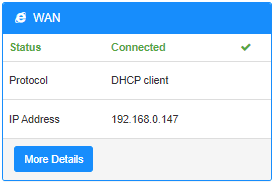
Schritt 6: Wenn die Konfiguration abgeschlossen ist, wird der Status unten auf der Seite „Systemstatus“ angezeigt.
18 Kommentare
Hallo,
ich habe das gleiche Problem wie hier am 02.08.2025 geschildert:
“Hello I have internet being fed from another router (“Network A”) to my Cudy LTE Modem/Router (“Network B”). If Network A loses internet but is still working as a network (just no internet). The Cudy LTE failover does not kick in because it does not realize the internet is down. I tried changing the online detection settings but that did not work.”
@Dear H,
Our technical support has contacted you via email. Please check.
“Hello I have internet being fed from another router (“Network A”) to my Cudy LTE Modem/Router (“Network B”). If Network A loses internet but is still working as a network (just no internet). The Cudy LTE failover does not kick in because it does not realize the internet is down. I tried changing the online detection settings but that did not work.”
Hello I have internet being fed from another router (“Network A”) to my Cudy LTE Modem/Router (“Network B”). If Network A loses internet but is still working as a network (just no internet). The Cudy LTE failover does not kick in because it does not realize the internet is down. I tried changing the online detection settings but that did not work.
@Dear Molon,
The function depends on the “Advanced Setting” —“Online Check” function. Did you disable it. If yes, please enable it.
“Hello, first my cuddy Lte n300 working well on 4g. My point is I configure WAN, and when I put my câble, the router switch on WAN/4G. Until now everything is working as expected but if my main router has a connectivity issue, the cuddy router still continu to work on WAN whereas there is no more connectivity. So I don’t see the automatic switch on 4G”
Hello, first my cuddy Lte n300 working well on 4g. My point is I configure WAN, and when I put my câble, the router switch on WAN/4G. Until now everything is working as expected but if my main router has a connectivity issue, the cuddy router still continu to work on WAN whereas there is no more connectivity. So I don’t see the automatic switch on 4G